

Let's be honest-staring at the blank box for your Etsy descriptions can feel completely overwhelming. You've already done the hard work of creating something amazing, but now you have to find the perfect words to convince someone to buy it. What do you even say? How do you make your products sound exciting without being salesy? And how in the world do you add keywords for SEO without it sounding like a robot wrote it? If that blinking cursor is causing more panic than profit, you're in the right place.
It’s time to trade that stress for a simple, calm-hustle approach. We've developed a simple, 4-part formula that takes all the guesswork out of writing descriptions that sell. In this guide, you’ll get a clear, repeatable process to write compelling copy that charms both your customers and the Etsy algorithm. We’ll even give you a copy-paste template so you can spend less time writing and more time creating. Get ready to turn those clicks into customers with confidence.
Key Takeaways
- Discover why your product description is a secret sales tool that works to both persuade shoppers and please the Etsy algorithm.
- Grab our simple, 4-part formula for writing compelling etsy descriptions every single time, taking the guesswork out of what to say.
- Put the formula into action immediately with a fill-in-the-blank template designed to save you time and end writer's block for good.
- Learn how to weave in important keywords naturally, so your listings connect with customers and sound like a real person, not a robot.
Why Your Etsy Description Is Your Secret Sales Superpower
Let's be honest, it's easy to fall into the trap of thinking, “Nobody reads descriptions anyway.” After spending hours on photos and titles, the description box can feel like a final chore. But treating it as an afterthought is one of the biggest missed opportunities for your shop. Think of your description not as a text block, but as your most dedicated, 24/7 virtual salesperson, working tirelessly even while you sleep.
A powerful description does two crucial jobs at once. First, it converts a curious browser into a confident buyer. Second, it signals to the Etsy algorithm what your product is about, helping you rank higher in search results. Mastering your Etsy descriptions is a gentle, sustainable way to build momentum and drive sales without the constant panic of paid ads or social media sprints.
The Human Connection: Turning Browsers into Buyers
This is your space to build trust and tell a story. Instead of just listing dimensions, paint a picture of how your product will solve a problem or bring joy to your customer’s life. Are you selling a digital planner? Describe the feeling of calm and control it brings to a chaotic week. This is where the principles of copywriting come into play-using words to connect emotionally, answer questions before they're asked, and showcase the unique personality of your brand.
The Algorithm's Role: How Etsy Search Sees Your Description
While you’re charming your human customers, you also need to speak the language of the Etsy algorithm. This powerful search engine scans your description for relevant keywords to understand what you're selling. When a shopper searches for “minimalist weekly planner,” Etsy looks for listings that use those terms. A well-written description, rich with relevant keywords, improves your listing's “quality score,” which is Etsy's way of saying your listing is a great match for a customer's search.
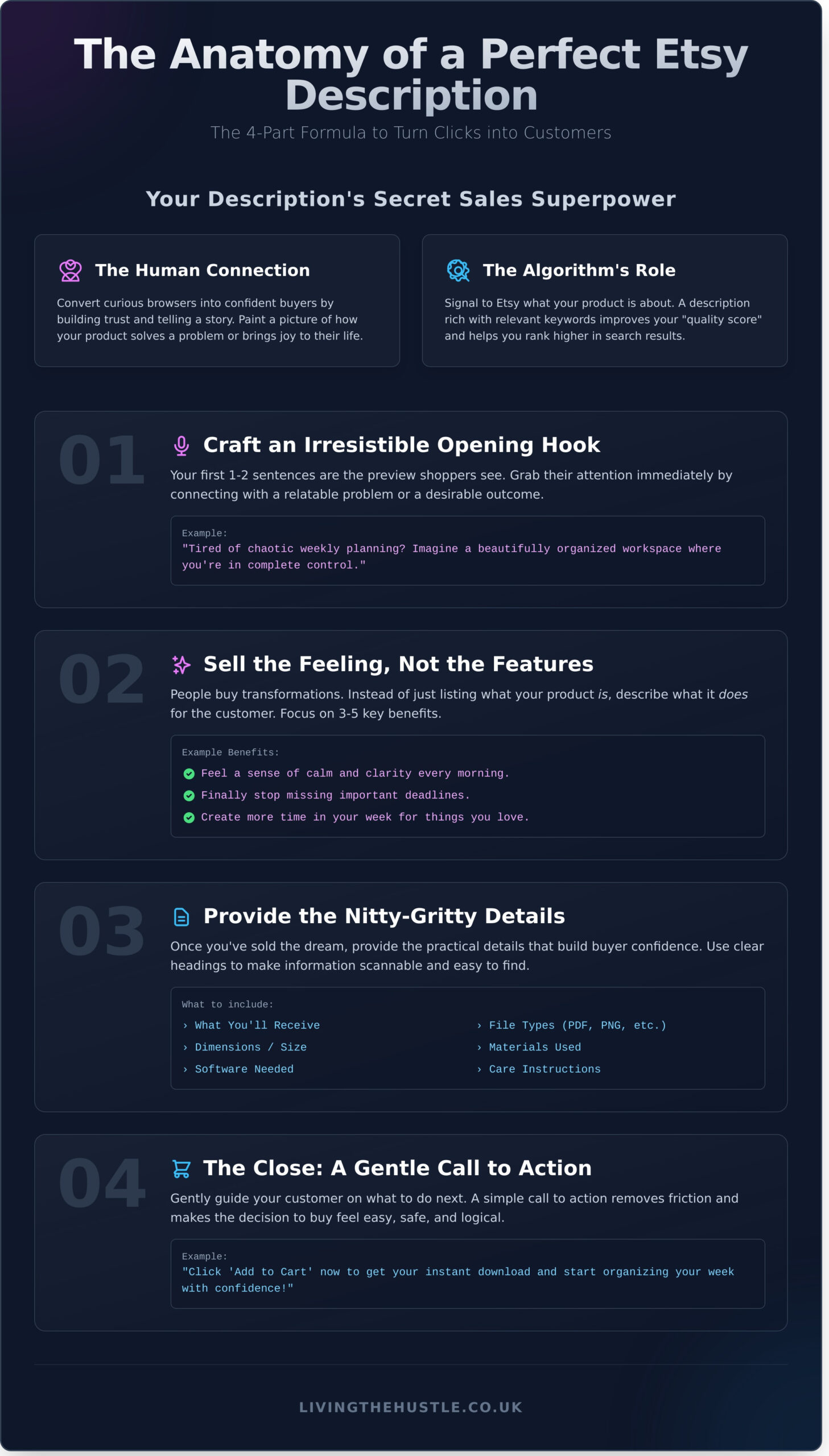
The Anatomy of a Perfect Etsy Description: The 4-Part Formula
Staring at a blank description box can feel overwhelming. What do you even say? Let's be honest-it’s tempting to just list the facts and call it a day. But a great description does so much more. It connects with your customer and turns a casual browser into a confident buyer.
Forget the panic. We're going to use a simple, 4-part formula that makes writing effective Etsy descriptions a calm and repeatable process. Think of it as your gentle guide to getting it right, every single time.
Part 1: Crafting an Irresistible Opening Hook
Your first two sentences are everything. This is the preview shoppers see before they click “Read more,” so you have to make it count. Start by connecting with a relatable problem (“Tired of chaotic weekly planning?”) or a desirable outcome (“Imagine a beautifully organized workspace.”). This immediately shows the customer you understand their needs and have a solution.
Part 2: Selling the Feeling, Not Just the File
People don't buy products; they buy better versions of themselves. Your description needs to sell the transformation, not just the features. Instead of saying your planner has daily layouts (a feature), say it helps them finally feel in control of their schedule (a benefit). Similarly, for physical goods, a brand might not just list fabric composition; they invite you to explore Second Skin Leggings to understand the feeling of comfort and confidence they provide. For more inspiration, browsing curated marketplaces like adamase.com can show you how different high-quality products are presented. Use a simple bulleted list to highlight 3-5 key benefits:
This shift from focusing on feelings to features is a core principle of emotional intelligence. To better understand how to connect with your customers' needs, you can check out EQ World for insights on empathy and communication.
- Feel a sense of calm and clarity every morning.
- Finally stop missing important deadlines and appointments.
- Create more time in your week for the things you love.
Part 3: The Nitty-Gritty: What They Need to Know
Once you’ve sold the dream, it's time to provide the practical details that build trust. Be clear and concise. Use simple headings like “What You’ll Receive” or “Product Details” to make information easy to find. For digital products, list file types (PDF, PNG), dimensions, and any software needed. For physical items, include materials, size, and care instructions.
And finally, Part 4: The Close. Gently guide your customer on what to do next. A simple “Click ‘Add to Cart' to get your instant download” is perfect. You can also build confidence by inviting them to reach out with questions. This isn't about being pushy; it's about making the decision to buy feel easy and safe for them.
Your Fill-in-the-Blank Etsy Description Template
Let's be honest-staring at a blank description box can feel overwhelming. The fastest way to move from panic to purpose is with a repeatable system. This template takes the guesswork out of writing compelling Etsy descriptions, giving you a calm, confident starting point for every single listing.
Save this somewhere you can easily access it. Think of it as your gentle first step to a streamlined workflow.
The Universal Etsy Description Template
Simply copy and paste this structure into your Etsy listing and fill in the bracketed prompts. It’s designed to capture attention and provide all the necessary information in a clear, scannable format.
[HOOK: A single, relatable sentence that speaks to your customer's problem or desire.]
Tired of feeling disorganized and overwhelmed? Imagine having a clear, calm plan for your entire week, all in one beautifully designed space. Our [Product Name] is here to help you turn chaos into clarity.
✨ [BENEFITS: A bulleted list of 3-5 key transformations or results your customer will experience.]
- Finally achieve [Specific Goal #1, e.g., your weekly goals].
- Feel more [Positive Emotion, e.g., calm and in control].
- Save time by [Benefit #3, e.g., having everything in one place].
📋 [DETAILS: The essential specs, what’s included, and how to use it.]
This is a [Product Type, e.g., digital download] compatible with [Software, e.g., Goodnotes, Notability].
WHAT YOU'LL RECEIVE:
- [File Type #1, e.g., 1x PDF with the digital planner].
- [File Type #2, e.g., 1x PDF with instructions].
[CLOSE: A friendly call to action that encourages a purchase or further engagement.]
Ready to get started? Add the [Product Name] to your cart and begin organizing your life today! Have a question? Feel free to send me a message.
Explore more tools for your calm hustle here: [Link to your Etsy shop or a relevant section]
Example in Action: A Digital Planner Description
Ready to see it come to life? Here’s a full description for a fictional digital planner using the template. Notice how keywords like “digital planner,” “Goodnotes planner,” and “iPad planner” fit in naturally.
Ready to trade daily chaos for mindful productivity? Our Undated Digital Planner for Goodnotes helps you organize your life with intention, so you can focus on what truly matters.
✨ With this iPad planner, you will:
- 🗓️ Plan your months, weeks, and days with ease using hyperlinked tabs.
- 🧘♀️ Reduce stress with dedicated wellness and habit trackers.
- ✅ Gain clarity on your goals with vision board and project planning pages.
- 🎨 Customize your planning experience with included digital stickers.
📋 WHAT YOU’LL RECEIVE:
This is an instant digital download. No physical item will be shipped.
- 1x PDF file containing the Undated Digital Planner.
- 1x Goodnotes file with pre-cropped digital stickers.
- 1x PDF with simple instructions for getting started.
Ready for a more peaceful and productive year? Add this digital planner to your cart and start your journey to calm organization instantly!
Explore the whole collection here: [Your Shop Link]
Tips for Making the Template Your Own
This template is your foundation, not a rigid rulebook. To make your descriptions truly shine, swap out words to match your brand’s unique voice. If you sell physical art prints, you might move the “Details” section higher up. The goal is to create a consistent and confident process that feels authentic to you and your shop.
Weaving in Keywords for Etsy SEO (Without Sounding Robotic)
Let's be honest-the term “SEO” can feel a bit cold and technical. But at its heart, it's simply about connecting your amazing products with the people searching for them. Crafting effective etsy descriptions is about speaking your customer's language. Your description is a powerful place to do this, but it's just one piece of the puzzle, working alongside your titles and tags to help you get found.
The goal is to sound like a helpful friend, not a robot. Here’s how to do it with calm and confidence.
Finding the Right Keywords for Your Products
Feeling overwhelmed by where to start? Take a gentle first step. The goal isn't to find every keyword imaginable, but to find the right ones. Here's a simple process:
Sometimes the best way to start is to set the right environment for creativity. A quiet space, your favorite notebook, and a quality cup of coffee can make all the difference. For a premium, ethically sourced brew to fuel your brainstorming session, many sellers enjoy Café Delicioso.
- Brainstorm: Grab a notebook and jot down 5-10 phrases you would use to search for your item if you were a customer. Think about its style, use, and who it's for.
- Use Etsy Search: Type your best ideas into the Etsy search bar. Pay close attention to what it suggests-that's what real shoppers are looking for!
- Validate with Tools: Tools can give you the confidence that you're on the right track. For a deep dive, read our guide on eRank for Etsy to help find and validate keywords.
Strategic Keyword Placement in Your Description
Once you have your keywords, you don't need to force them in everywhere. Place your most important phrase (your primary keyword) in the first one or two sentences. Then, naturally sprinkle 2-4 other relevant keywords throughout the rest of your text. Use more specific, long-tail keywords (like “eco-friendly A5 weekly planner insert”) in the detailed specifications section. This helps both the algorithm and the customer understand exactly what you're selling.
What to Avoid: The Dangers of Keyword Stuffing
Keyword stuffing is the practice of loading your description with keywords to try and manipulate your ranking. It makes your text unreadable and can actually hurt your shop's visibility because Etsy prioritizes a good customer experience.
See the difference?
- Keyword-Stuffed: Our boho wall art is printable wall art. This digital download wall art is perfect boho decor for your living room wall art.
- Natural & Helpful: Instantly refresh your space with this beautiful piece of boho wall art. As a printable digital download, you can have this stunning design on your wall in minutes.
Always put your customer first. Clear, helpful information that solves a problem or sparks joy will always perform better than a robotic list of keywords.
Bringing Your Brand Voice to Life in Your Descriptions
You’ve perfected your product, taken beautiful photos, and optimized your titles. But what about your brand’s personality? Your product description is one of the best opportunities you have to connect with a shopper and show them what makes your shop unique. It’s where you move beyond features and start building a real relationship.
A consistent brand voice doesn’t just make your shop memorable; it builds trust and attracts your ideal customers-the people who will truly love what you create. Let’s be honest, you want to attract buyers who resonate with your style, not just anyone.
Defining Your Shop's Tone and Personality
Before you can write with personality, you need to define what that personality is. Feeling a little stuck? Start by asking yourself how you want your customers to feel when they interact with your brand. Think about who you are and how you’d talk to your ideal customer if they were standing in front of you.
- Choose 3-5 words that describe your brand. Are you playful, vibrant, and bold? Or maybe calm, gentle, and minimalist?
- Create a simple style guide for yourself. Note your chosen words and any specific phrases you like to use (or avoid) to maintain consistency across all your etsy descriptions.
If you need a gentle, step-by-step process to get clear on your brand's foundation, our Blog, Brand & Bloom Workbook can guide you through this process without the overwhelm.
Using Formatting to Enhance Readability & Style
Your brand voice isn't just about the words you choose-it's also about how you present them. A huge wall of text can feel overwhelming and doesn't invite your customer to engage. Instead, use formatting to reflect your personality and make your key points easy to digest.
- Keep paragraphs short and sweet. Aim for 2-3 sentences max to create plenty of white space and make your description scannable.
- Use bullet points or numbered lists for key features, materials, dimensions, or care instructions. This breaks up the text and highlights the most important information.
- Add emojis strategically. A well-placed emoji ✨ can add a touch of personality and visual interest. Just be sure it aligns with your brand’s tone and doesn’t clutter the text.
Mastering Your Etsy Descriptions and Beyond
You now have the tools and the template to transform your product listings from simple text into a powerful sales tool. Remember, a great description is a conversation that builds trust. By blending our four-part formula with strategic keywords and your unique brand voice, you can write compelling etsy descriptions that don't just inform-they connect and convert.
Writing compelling descriptions is a huge step forward, but it's just one part of creating a business that feels calm and sustainable. If you're ready to go beyond listings and build a complete, thriving digital product shop, we're here to help. The Passive Income Society offers a proven framework for calm, sustainable business growth. With step-by-step guidance for total beginners and a community of thousands of successful sellers, you'll have everything you need to grow with confidence, not overwhelm. Ready to build a complete, thriving digital product shop? Explore the Passive Income Society course.
You have the creativity and the drive. Now you have a roadmap. You’ve got this.
Frequently Asked Questions
How long should an Etsy description be? Is there a character limit?
While Etsy doesn't have a strict character limit, overwhelming your customer with text is never a good idea. Aim for clarity, not length. Focus on a strong opening sentence to hook the reader, use bullet points for key details like dimensions and materials, and then add a few sentences that tell a story. A well-structured description of 150-250 words is often the sweet spot for providing information without causing overwhelm.
Can and should I use emojis in my Etsy descriptions?
Yes, absolutely! Emojis are a wonderful way to add personality and break up large blocks of text, making your description easier to read. Use them strategically to draw attention to important details. For example, you could use a ✨ to highlight a special feature or a 📦 to list shipping information. Just be sure they align with your brand’s voice and don’t clutter the message you want to send to your customer.
Is it okay to use an AI writer like ChatGPT to help with my Etsy descriptions?
Using an AI writer can be a fantastic way to beat writer's block and get your creative ideas flowing. Think of it as a helpful starting point, not the final product. Use it to brainstorm keywords or draft an outline, but always go back and infuse it with your unique brand voice and specific product details. Your personal touch is what connects with buyers and helps you stand out, so make sure the final text sounds like you.
What's the difference between the information in my tags versus my description?
This is a great question! Think of it like this: your tags are for the Etsy search engine, and your description is for your human customer. Tags are short, specific keyword phrases (e.g., “boho wall art,” “printable daily planner”) that help Etsy show your listing to the right people. Your description then uses full sentences to persuade that person to make a purchase by explaining the benefits and details of your product.
How do I add a link to another one of my listings in a description?
Etsy doesn't currently support clickable hyperlinks in descriptions, but you can still guide shoppers to other products. The best method is to simply copy the full URL of your other listing and paste it directly into the text. While shoppers can't click it, they can easily copy and paste it into their browser. Use a simple call to action like, “Find the matching prints here:” followed by the link.
Should I update the descriptions of my older listings?
Yes, this is a calm and powerful way to improve your shop's performance. As your business grows, you learn more about what your customers are looking for. Revisiting older listings to refresh your Etsy descriptions with new keywords, better formatting, and clearer benefits can breathe new life into them. It’s a gentle task that can lead to a wonderful boost in views and sales without the pressure of creating something from scratch.