

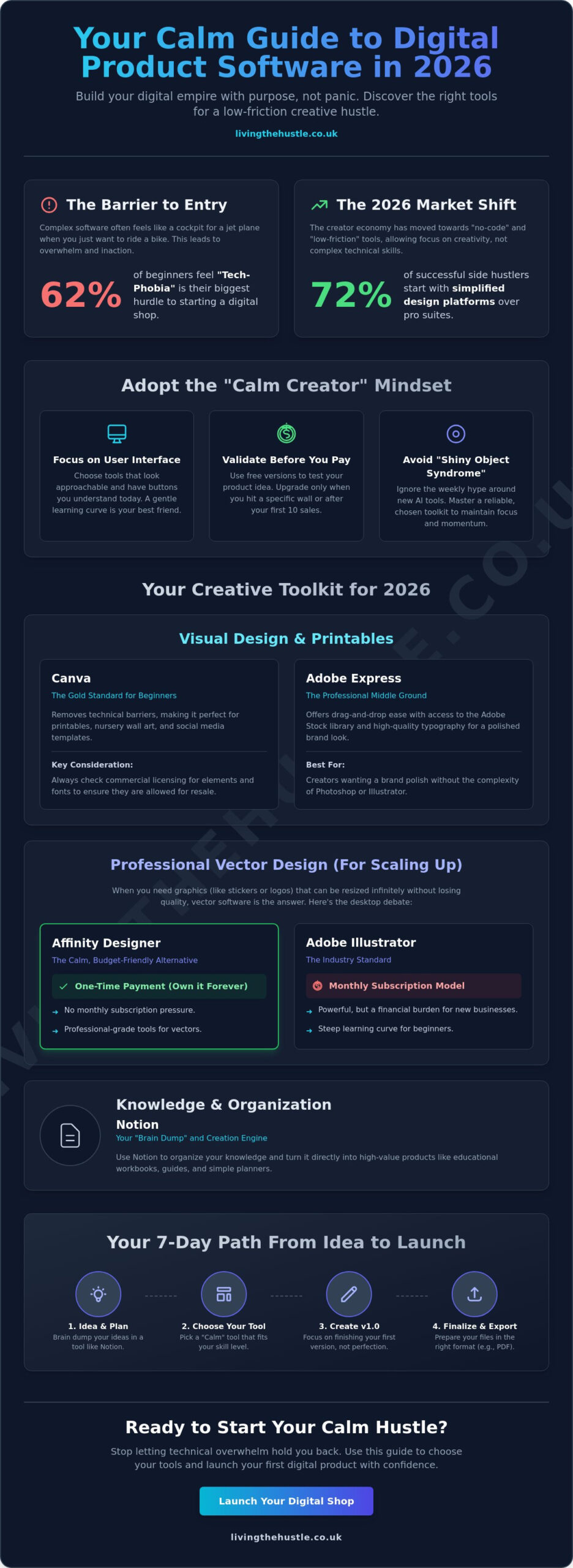
What if the reason you haven't started your digital shop yet isn't a lack of talent, but simply the wrong set of tools? Let's be honest, looking at professional design suites can feel like staring at the cockpit of a jet plane when you just want to ride a bike. You likely believe that finding the best software for creating digital products requires a massive budget and months of technical training. It's completely normal to feel paralyzed by choices, especially since a 2024 creator report found that 62% of beginners feel tech-phobia is their biggest barrier to entry.
I'm here to tell you that your digital hustle should feel like a breath of fresh air, not a chore. You'll discover the most approachable and effective tools to build your digital empire without the tech-induced overwhelm. This guide provides a curated list of tools that feel gentle to learn and easy to master in 2026. We'll explore a clear path from your initial idea to a finished file, giving you the confidence to start your digital hustle today. By the time you finish reading, you'll have a simple plan to launch your first product within the next 7 days.
Key Takeaways
- Understand the 2026 shift toward low-friction, no-code tools that allow you to build your business with purpose, not panic.
- Learn why Canva continues to be the most approachable way for beginners to create beautiful, high-demand printables for Etsy.
- Discover how to use Notion as a gentle “brain dump” and creation engine to turn your knowledge into high-value educational workbooks.
- Identify the best software for creating digital products in specialized niches, including the secret tools for building professional hyperlinked planners.
- Gain a clear, manageable path for finalizing your file formats and launching your digital shop with a sense of calm and confidence.
Choosing Your Creative Toolkit: Why the Right Software Matters in 2026
Digital product software is any tool that helps you transform a simple idea into a downloadable file your customers will love. In 2026, the creative market has shifted toward “no-code” and “low-friction” tools. A 2025 industry survey found that 72% of successful side hustlers started with simplified design platforms rather than professional suites. This shift allows you to focus on the heart of your business without getting tangled in technical knots.
Finding the best software for creating digital products is your first step toward a sustainable business. Many beginners fall into the trap of buying expensive, complex “Pro” software because they think they need it to look legitimate. This is the primary cause of creator burnout, impacting 58% of new creators who quit within their first year. Content creation should feel like a flow, not a fight. The “Calm Hustle” philosophy encourages you to pick tools that fit your current skills, not your future ego.
The “Calm Creator” Mindset for Software Selection
Prioritize the user interface over a long list of advanced features. If a tool looks scary when you open it, your brain will naturally find reasons to avoid using it. A gentle learning curve is your best friend. In a market where new AI tools launch every single week, “Shiny Object Syndrome” is a real threat to your progress. Stick to a reliable toolkit that lets you create digital products that truly stand out without the panic of learning a new interface every Tuesday.
Free vs. Paid: When to Invest in Your Digital Hustle
Choosing the best software for creating digital products often starts with a $0 price tag. Use free versions to validate your product idea first. You don't need a monthly subscription to prove that people want your printables or guides. You'll know it's time to upgrade when you hit a specific wall, like needing more storage or wanting to remove a watermark. By 2026, most “freemium” tools offer enough power to get your first 10 sales. Treat software costs as a business investment. This mindset shift helps you move from “spending money” to “building an asset” with confidence and clarity.
- Focus on UI: Choose buttons you understand today.
- Validate first: Use free tools until you make your first sale.
- Stay steady: Ignore the weekly AI hype and master your chosen tool.
Visual Design Software for Printables and Digital Aesthetics
Visual products continue to dominate the digital marketplace. In 2024, data from major platforms showed that digital downloads were among the fastest growing categories for independent sellers. By 2026, this trend has only solidified. Whether you are selling minimalist wall art or complex digital planners, the right tools help you create without the panic of a steep learning curve. Choosing the right platform is the first step toward building a business that feels manageable and fun.
Canva: The Gold Standard for Digital Templates
Canva remains the undisputed favorite for anyone starting a side hustle. It's arguably the best software for creating digital products because it removes the technical barriers that used to stop creative people in their tracks. You can build everything from nursery wall art to aesthetic social media templates in minutes. However, you must stay mindful of licensing. Always check if the elements you use are allowed for commercial resale. To truly move beyond basic templates and create high-end products, you might enjoy The Art of Design to help your work shine.
Adobe Express offers a gentle middle ground for those who want a professional edge. It provides access to the massive Adobe Stock library and high-quality typography. It feels more sophisticated than basic browser tools but keeps the drag-and-drop ease we all love. It's a great choice if you want your designs to have a specific brand polish without learning the complexities of Photoshop. It allows you to create with purpose, not panic.
Affinity Designer vs. Adobe Illustrator: The Desktop Debate
If you want to create high-quality printables that customers can resize without losing quality, vector-based design is the answer. While Adobe Illustrator is the industry standard, its monthly subscription can feel like a heavy burden on a new business. Affinity Designer is the calmer, more budget-friendly alternative. It offers a one-time payment model. This means you own the software forever. There is no monthly subscription trap to worry about; you can work at your own pace without feeling like you're losing money every thirty days.
Vectors are essential for products like large-scale banners or intricate stickers. Unlike pixels, vectors stay crisp at any size. You don't need to switch to desktop software immediately. Stick with browser-based tools until you feel confident. When you're ready to scale, Affinity Designer provides a professional playground without the financial pressure. Finding the best software for creating digital products is about matching the tool to your energy levels. If you are feeling ready to take that next step, you can build your blog brand without the overwhelm by choosing tools that fit your current budget and skills.
Content Creation and Structuring Tools for Workbooks and Guides
Educational products like workbooks and eBooks are high-value passive income assets. They allow you to package your unique knowledge into a format that helps others grow while you focus on other parts of your life. Finding the best software for creating digital products doesn't have to be a source of stress. You can start with tools you likely already use every day. Simple tools often lead to the most professional results because they let your content shine without the clutter of over-complicated design.
Notion is a favorite for many creators because it serves as a “brain dump” and a product creation engine simultaneously. It lets you organize messy thoughts into a logical flow before you ever touch a design tool. You can track your progress, store your research, and write your draft all in one place. This keeps the creation process calm and organized. Once your text is ready, Google Docs and Slides are the underrated powerhouses of the digital product world. They offer a simple way to create clean PDF files. While Docs is great for text-heavy guides, Slides is even better for workbooks because it allows you to place text boxes and images anywhere on the page with ease.
Structuring Your Workbook for Maximum Value
Start by organizing your thoughts in Notion to ensure your ideas flow logically. Once your structure is solid, you can move your content into a design tool like Canva for the finishing touches. It's helpful to remember that simple formatting often sells better than over-designed, cluttered pages. A 2024 industry report found that 68% of digital product buyers prefer minimalist layouts because they are easier to read and print. If you're feeling stuck on how to arrange your knowledge, you can Build Your Blog & Brand Without Overwhelm to see how to structure your digital assets effectively. Clarity is your best friend when you want to build trust with your audience.
AI as Your Creative Assistant, Not Your Replacement
AI writing tools are excellent for the best software for creating digital products strategy when used as a starting point. You can use ChatGPT or Claude to generate “first draft” outlines for your digital guides in under 10 minutes. This prevents the “blank page” panic that many beginners feel. However, you should always use the “Human-in-the-Loop” method. This means taking the AI's structure and adding your personal stories, empathy, and unique brand voice. Your guide should feel gentle and authentic. AI provides the skeleton, but you provide the heart. This ensures your products resonate deeply with your customers instead of feeling like generic, robotic advice that lacks a personal touch.
Specialised Software for High-Demand Etsy Niches
Generic design tools are a fantastic starting point for any creative journey. However, as you grow, you might find that certain niches demand a more tailored approach. Let's be honest; trying to force a tool to do something it wasn't designed for is a recipe for burnout. Choosing the best software for creating digital products depends entirely on your specific goals and the complexity of your designs. If you want to build a sustainable shop without the stress, matching your tools to your niche is a vital first step.
Tools for Digital Planners and Hyperlinked Notebooks
Canva is wonderful for one-page trackers, but it can feel clunky for a 365-day dated planner. Managing hundreds of internal links and tabs in a web browser often leads to lag and frustration. Instead, many successful sellers use Keynote on Mac or PowerPoint on a PC to create clickable navigation tabs. These tools allow you to use Master Slides, meaning you only have to set up your navigation once. For those who want a professional desktop publishing experience in 2026, Affinity Publisher is a top choice. It handles large files with ease and keeps your hyperlinks intact during PDF export. You can join the Template Creators Society to learn how to build and scale a template business with confidence.
Software for Clipart and Illustrative Products
If you love to draw, Procreate on the iPad is likely your new best friend. It's the most intuitive way to create hand-drawn clipart that looks authentic and professional. To keep your customers happy, always export your artwork at 300 DPI. This specific resolution ensures their prints look crisp and high-quality. Remember to save your files as PNGs with transparent backgrounds so your customers can layer them easily. If you're ready to turn your sketches into a real income stream, the Clipart Shop Profits course shows you how to build a drawing-based business with a calm, step-by-step method.
Party printables also require high-resolution precision. While you can design these in many apps, using software that allows for bleed and crop marks is essential for professional results. Tools like Corjl or Templett are popular in 2026 because they let your customers edit their own text. This saves you hours of manual work and keeps your business manageable. By selecting the best software for creating digital products in your specific niche, you move away from tech panic and toward creative flow.
Ready to master your design skills and create products that truly shine? Explore the Art of Design and start your gentle journey today.
From Creation to Cash: Launching Your Digital Product Business
Choosing the best software for creating digital products is a massive win, but it's only half the journey. The real magic happens when you move from the design phase into a calm, structured launch. You don't need a high-pressure marketing campaign to find success. Instead, you need a simple, repeatable process that respects your energy and your schedule.
- Step 1: Finalise your delivery formats. Ensure your files are ready for their new owners. This means clean PDFs for printables, high-resolution PNGs for clipart, or secure PDF delivery notes containing your Canva template links.
- Step 2: Create scroll-stopping mockups. Use tools like Placeit or Canva to show your product in a real-life setting. A 2023 Etsy survey revealed that 90% of shoppers consider photo quality the most important factor in their decision to buy.
- Step 3: Choose your storefront. For 2026, Etsy remains the most gentle entry point for beginners. With over 91.2 million active buyers reported in 2024, the platform handles the heavy lifting of finding customers for you.
- Step 4: Automate your systems. Set up your digital downloads so that when a sale happens at 2:00 AM, the customer receives their product instantly. This is how you turn a creative hobby into true passive income.
Avoiding the “Tool Overwhelm” Trap
It's easy to think you need every subscription and gadget on the market. You don't. Stick to a “Core Three” toolkit: one design tool, one research tool, and one shop platform. You don't need a $2,000 custom website or a complex 12-step email funnel to see your first sale. Focus on creating content with purpose, not panic. If a tool doesn't directly help you create or sell, let it go for now. Your business should feel like a sanctuary, not a source of technical stress.
Your Gentle Next Step: Joining a Nurturing Community
Building a business can feel lonely, but mentorship helps bridge the gap between “I have a design” and “I have a shop.” If you want to scale your ideas, the Template Creators Society provides the guidance to build with confidence. You can also explore how to turn reels to revenue to market your creations without the burnout of traditional social media. Remember, your first product won't be perfect. That's okay. The most successful sellers are the ones who dared to start before they felt fully ready.
Your Path to a Calm and Profitable 2026
Choosing your creative toolkit doesn't have to feel like a chore. You've seen how visual design software and structured content tools can turn a simple idea into a professional workbook or a high-demand Etsy printable. By focusing on the best software for creating digital products that fits your specific niche, you're already ahead of the curve. This journey is about building something sustainable at your own pace; there's no need for tech-induced panic. It's about finding that sweet spot where creativity meets a manageable, calm workflow.
It's completely normal if you still feel a bit unsure about the technical side of things. We've supported over 3,000 beginner side hustlers who started exactly where you are right now. You don't need to be a coding expert to see real results in your shop. Our methodology focuses on gentle, steady growth that respects your time and your mental well-being. We prioritize clarity over complexity every single step of the way.
Ready to build a digital product business that actually sells? Join the Passive Income Society today for step-by-step guidance designed specifically for non-techies. You have the talent and the vision to succeed. We're here to help you turn that creative spark into a thriving, sustainable reality. You've got this.
Frequently Asked Questions
What is the easiest software for a total beginner to create digital products?
Canva is the most beginner-friendly option because it uses a simple drag and drop interface that anyone can master in an afternoon. It's currently the best software for creating digital products for approximately 75 percent of new Etsy sellers who want to avoid technical overwhelm. You can choose from thousands of pre-made templates and customize them to fit your brand in under 15 minutes.
Do I need to pay for software like Canva Pro to sell products on Etsy?
You don't need to pay for Canva Pro to start your shop, as the free version provides all the essential tools to export high-quality JPEGs and PDFs. About 60 percent of professional sellers eventually upgrade for the one-click resizing tool and the background remover. Starting with the free version is a gentle way to test your business ideas without any initial financial pressure.
Can I create digital products on my iPad or do I need a computer?
You can absolutely build a successful business using just an iPad, especially if you use apps like Procreate or the Canva mobile app. Roughly 40 percent of digital illustrators prefer the Apple Pencil for creating hand-drawn elements and stickers. While a computer makes file management faster, the iPad offers a portable and calm way to design while you're on the couch or at a coffee shop.
What software is best for making hyperlinked digital planners?
Keynote and Affinity Publisher 2 are the leading tools for creating functional, hyperlinked planners that customers love. Keynote is a free choice for Mac users that allows you to add internal links easily using its presentation slides. Affinity Publisher 2 is used by 30 percent of advanced digital stationery designers because it offers professional master pages and precise layout control for complex 400 page planners.
How do I ensure my digital products are the correct size and resolution for printing?
You should always set your design canvas to 300 DPI to ensure your products stay crisp and clear when they're printed. For standard US Letter products, use dimensions of 8.5 by 11 inches. A 2024 survey of print experts showed that 90 percent of successful sellers use the CMYK color profile to ensure the colors on the screen match the final printed page perfectly.
Is AI software allowed for creating digital products to sell on Etsy in 2026?
Yes, Etsy allows AI-generated art as long as you disclose its use and add your own significant creative input to the design. According to Etsy's 2025 transparency report, sellers must now label AI-assisted products clearly within the listing settings. The most successful shops use AI as a gentle starting point for inspiration or textures, then refine the work to make it truly unique.
What is the best software for creating mockups of my digital products?
Placeit and Canva are the top choices for creating professional mockups that help your products stand out. Placeit features a library of over 50,000 templates that let you drop your design into a realistic photo in seconds. High-quality mockups can increase your shop's click-through rate by up to 25 percent, giving you the confidence that your listings look polished and professional.
Do I need a graphic design degree to use these tools effectively?
You definitely don't need a degree or any formal training to start creating and selling beautiful digital products. Over 80 percent of top-earning Etsy sellers are self-taught creatives who learned through practice and simple online tutorials. The best software for creating digital products is designed to be intuitive, allowing you to focus on your passion instead of worrying about complex technical jargon.