

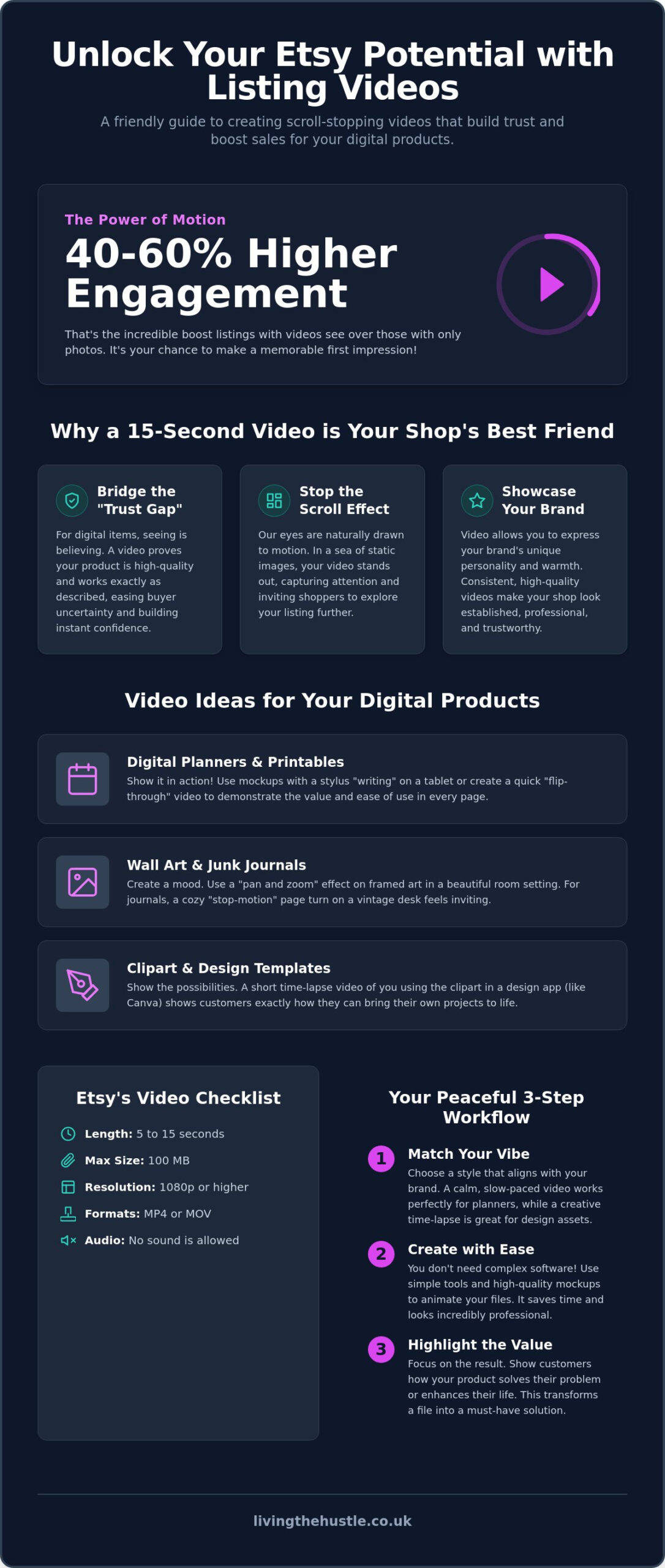
Did you know that listings with videos see 40 to 60 percent higher engagement than those with only photos? In a crowded marketplace, a simple etsy listing video can be the difference between a shopper scrolling past or clicking “Add to Cart.” You've likely felt the frustration of staring at a digital file, wondering how to make a PDF or a template feel “real” to a customer who can't touch it. It's common to worry that your shop looks a bit unfinished or unprofessional compared to established brands.
I understand that technical anxiety can feel like a heavy weight. You don't want to waste hours on complicated editing software that doesn't even lead to sales. This guide is here to help you find a calmer path to growth. I'll show you how to create professional videos that build deep trust and stop the scroll without the typical tech overwhelm. We'll explore a repeatable, low-stress workflow that turns your digital inventory into a trustworthy brand that earns passive income while you sleep. By the end of this article, you'll have a clear plan to make your shop shine with confidence and ease.
Key Takeaways
- Learn how a 15-second “visual handshake” builds trust and shows customers exactly how your digital product works.
- Explore how to use video mockups to bring static files to life while staying true to your brand's unique vibe.
- Master the 2026 technical specs for your etsy listing video using simple, stress-free tools that save you time.
- Follow a peaceful, three-step workflow to highlight the value and results of your digital creations.
- See how high-quality visuals can help you command premium prices and grow your passive income shop sustainably.
Why Etsy Listing Videos are the Secret to a Calm and Trustworthy Shop
Think of your etsy listing video as a 15-second visual handshake. It's the first moment a customer feels your brand's warmth and professionalism. For digital products, the biggest hurdle is often the “trust gap.” Since shoppers can't hold your item, they might feel a flicker of uncertainty. Is the resolution actually clear? Do the links work? Motion proves that your file is high-quality and ready to use. By showing the product in action, you reduce buyer anxiety and show them exactly what to expect after they click “purchase.” This simple step transforms a static image into a tangible solution.
The Psychology of Motion in Digital Sales
Our eyes are naturally drawn to movement. In a crowded Etsy search result page, a sea of static images can start to look the same. A video thumbnail breaks this pattern, creating a “stop the scroll” effect that can lead to 40 to 60 percent higher engagement rates. It's not just about catching the eye; it's about making an emotional connection. You're transforming a flat PDF into a lifestyle improvement. Sensory bridging for digital sellers is the intentional use of motion to simulate the tactile, “real-world” experience of a digital file. Understanding the basics of what is video marketing can help you see how these small clips build a bridge between your screen and your customer's heart.
Video vs. Still Images: The Branding Advantage
While still photos are a requirement, an etsy listing video allows you to showcase your brand personality with a sense of peace and authenticity. It gives you the space to highlight tiny, impressive details that often get lost in a gallery. Using video to show your product's functionality builds confidence without the need for a long sales pitch. Consider how these visual touches can help:
- Demonstrating hyperlinked tabs in a digital planner to show ease of use.
- Zooming in on the intricate textures of digital clipart or junk journal pages.
- Showing a quick “flip-through” of a workbook to prove its value.
Consistency in your video style builds long-term shop authority. When every listing has a similar, high-quality feel, your shop looks established and trustworthy rather than amateur. This visual harmony is a key part of the art of design. It helps you stand out in a competitive market while maintaining a manageable, low-stress workflow that supports your creative energy.
Choosing Your Video Style: Niche Strategies for Digital Creators
Most advice for an etsy listing video focuses on physical items like clay earrings or hand-poured candles. As a digital creator, your path is different. You're selling a promise of organization, beauty, or creativity. To do this effectively, your video “vibe” must match your target audience. Are you targeting the boho-chic planner or the sleek, minimalist entrepreneur? Keep your transitions slow and intentional. A frantic, high-energy video might feel jarring to someone looking for a peaceful planning experience. Aligning your video speed with a calm aesthetic helps build a brand that feels manageable and professional.
You don't need to be a professional filmmaker or even appear on camera to succeed. Many of the most successful shops use digital templates and mockups to animate their static files. This allows you to maintain a professional look while keeping your personal privacy intact. For those looking for a deeper dive into strategy, this ultimate guide to video marketing offers excellent insights into how motion influences buyer behavior. By using high-quality mockups, you can create a high-converting etsy listing video that looks like it was made in a professional studio.
Animate Your Digital Planners and Printables
For planners, focus on showing the product in its natural habitat. Use mockups that feature a tablet with a stylus “writing” on the screen for GoodNotes products. This proves the product is functional and easy to navigate. A quick flip-through of the pages demonstrates the incredible depth of your work. You can learn to create digital products that truly stand out by focusing on these interactive details that photos simply can't capture.
Visualising Wall Art and Junk Journals
For art and printables, the “pan and zoom” effect is your best friend. Start with a wide shot of a framed piece in a beautiful room, then slowly zoom in to show the texture and crisp lines. If you sell junk journals, try a “vintage desk” aesthetic. Create a stop-motion feel by showing pages turning on a wooden background with a cup of tea nearby. It feels cozy and inviting. You can sell more junk journal printables with confidence when you show customers the tactile beauty of your designs.
Showcasing Clipart and Design Templates
Clipart sellers benefit from “Design-in-Action” videos. Record a short time-lapse of yourself using your clipart in Canva to create a card or a social media post. This takes the guesswork out of the purchase. It shows the customer exactly how they can use your files to save time and stress. This is a great way to build a successful clipart business with confidence while providing genuine value. If you're ready to take your shop to the next level, our Passive Income Society course provides the roadmap you need for sustainable growth.
Technical Specs and the “Calm” Tool Stack for 2026
Creating an etsy listing video doesn't require a Hollywood studio or expensive equipment. In fact, keeping your technical process simple is the best way to ensure you actually get your listings live without feeling drained. For 2026, Etsy has specific requirements you must follow to ensure your video uploads successfully. Your video should be between 5 and 15 seconds long. While the minimum resolution is 500px, I highly recommend using 1080p (1920 x 1080 pixels) for that crisp, premium look that builds shopper confidence.
Regarding dimensions, square (1:1) or vertical ratios like 4:5 or 9:16 are the gold standard for mobile viewing. Since over 65 percent of Etsy traffic comes from mobile devices, designing for the phone screen is a smart, peaceful strategy. You can find more detail in Etsy's official guide to listing videos. Remember that the maximum file size is 100 MB. If your file is too large, use a simple online compressor to shrink the size while keeping the visual quality high. You don't need to overcomplicate this part.
Your smartphone is often the only camera you'll ever need. Use it to record “over-the-shoulder” footage of you scrolling through your digital product on a laptop or tablet. This raw, authentic look shows that a real person is behind the shop. It feels honest. It feels human. It bridges that trust gap we discussed earlier without requiring you to learn complex cinematography.
Canva for Etsy Videos: A Match Made in Heaven
Canva is the ultimate “calm” tool for digital sellers. It allows you to create professional videos using drag-and-drop mockups and “Magic Animate” features. You can build a single video template that matches your brand colors and fonts, then simply swap out the product screenshots for every new listing. This repeatable workflow turns a daunting task into a five-minute habit. For a full list of resources, check out our guide on the Best Etsy Seller Tools for 2026.
SEO and the Etsy Algorithm
Adding an etsy listing video isn't just about looking good. It sends positive signals to the Etsy algorithm. When shoppers spend more time watching your video, it tells the platform that your listing is relevant and engaging. Higher engagement can lead to better visibility in search results over time. To stay ahead of what shoppers are looking for, I recommend using tools like eRank to spot visual trends in your niche. You can learn more in our eRank for Etsy Sellers: A Beginner’s Guide. Understanding these data points helps you grow your shop with intention rather than guesswork.
Step-by-Step: Creating Your First Listing Video Without the Overwhelm
Creating your first etsy listing video shouldn't feel like a mountain to climb. It's simply about showing your customer the joy of using your product. Let's break this down into a manageable, five-step workflow that you can repeat for every new item in your shop. This methodical approach ensures you stay productive without losing your peace of mind.
- Step 1: Plan your 15-second story. Focus on three key moments: The Hook (stop the scroll), The Value (show the product features), and The Result (the benefit to the buyer).
- Step 2: Choose a high-quality mockup. Select a digital mockup that matches your brand colors. This creates a cohesive look across your entire shop.
- Step 3: Animate your product. Use simple tools to show your digital file in action. This might be a screen recording of a planner or a “pan and zoom” effect on a piece of wall art.
- Step 4: Add subtle text overlays. Use clear, simple text to highlight key features like “Editable in Canva” or “Instant Download.” This answers customer questions before they even ask.
- Step 5: Export and upload. Save your file as an MP4 and upload it directly through the Etsy Shop Manager.
If you're feeling stuck on how to pull all these visual elements together, you can build your blog brand without the overwhelm by following a clear, step-by-step branding strategy. Having a solid brand foundation makes every video you create feel like a natural extension of your shop.
The Three-Second Rule for Etsy Search
You have a very small window to capture attention. In Etsy search, the most important visual must happen in the first three seconds. Avoid “fluff” intros like your logo or a generic welcome message. Get straight to the product value. To hook a buyer who is quickly scrolling on a mobile device, show the finished, beautiful result of your product in the very first frame. This immediate clarity builds trust and encourages the click.
Optimising for Mobile Shoppers
Since most shoppers use smartphones, your etsy listing video must be easy to view on a small screen. Ensure your text overlays are large enough to read without squinting. It's also vital to center your action. Etsy sometimes crops videos automatically in search results, so keeping your product in the middle prevents important details from being cut off. This attention to detail is a key part of Passive Income Society, where we focus on creating professional shops that convert visitors into loyal customers. Ready to turn your creative ideas into a sustainable business? Join our community and discover the roadmap to Etsy success.
Scaling Your Shop: From Professional Visuals to Passive Income
Investing time in your etsy listing video is about more than just one sale. It's about building a sustainable brand that feels established and trustworthy. When your shop looks professional, you naturally move away from the “hobbyist” label. This transition is vital because professional visuals allow you to justify premium pricing. Customers are often willing to pay more for a digital product when they can clearly see its value and functionality through motion. It removes the guesswork and replaces it with confidence.
High-quality visuals also have a direct impact on your customer reviews. By showing exactly what a buyer receives, you set clear expectations. This transparency leads to happier customers and more five-star ratings. A shop filled with positive feedback and professional videos creates a cycle of trust that fuels passive growth. You're not just selling a file; you're providing a reliable solution that helps your customers achieve their own goals with ease. This “final bloom” in your branding process ensures your shop stands out for all the right reasons.
Repurposing Video for Social Media
Your 15-second Etsy video is a versatile asset. You don't need to create entirely new content for every platform. Instead, you can calmly repurpose these clips into high-performing Pinterest Pins or Instagram Reels. Short-form video often outperforms static ads because it captures the “lifestyle” of your product. You can learn how to turn short-form video into passive income to drive external traffic back to your Etsy shop without the stress of constant content creation. This approach ensures your marketing feels like a manageable part of your week rather than an overwhelming chore.
Your Next Steps to Etsy Success
As you begin this journey, remember to choose progress over perfection. You don't need to update every single listing today. Start by creating an etsy listing video for your top five best-sellers. Once you see the boost in engagement, you can slowly work through the rest of your shop at a pace that feels right for you. Building a successful business is a marathon, not a sprint. It's much easier when you have a supportive group of like-minded creators by your side.
If you're looking for a clear, manageable path forward, our Passive Income Society course provides the comprehensive roadmap you need. We've helped thousands of students launch and scale their digital shops with confidence. By focusing on professional visuals and a repeatable workflow, you can build a shop that thrives while you focus on the things that truly matter. Your journey to a peaceful and profitable shop starts with these small, intentional steps.
Your Path to a Peaceful and Profitable Etsy Shop
Building a successful digital shop shouldn't feel like a constant battle against complicated technology. By embracing the power of an etsy listing video, you've taken a significant step toward creating a brand that feels both professional and deeply personal. You now have the knowledge to bridge the trust gap with your customers and show them the true value of your digital creations. These small, intentional changes are exactly what lead to sustainable, long-term growth for your shop. Progress happens one calm step at a time.
If you're ready to move away from the high-pressure hustle and toward a more manageable way of working, I'd love to guide you. Ready to build your profitable Etsy shop calmly? Join the Passive Income Society today! You'll join over 5,000 students who are learning to scale their shops with step-by-step guidance designed specifically for non-techies. We focus on low-stress growth that honors your time and your creative energy. You've already done the hard work of starting. Now, let's bloom together. You've got this.
Frequently Asked Questions
Do I need a professional camera for Etsy listing videos?
You don't need a professional camera to create a high-quality etsy listing video. Most modern smartphones record in 1080p resolution, which is exactly what Etsy recommends for a crisp and premium look. This simple approach reduces technical overwhelm and lets you focus on your creative work. Natural lighting and a steady hand are often all you need to make your digital products shine with a professional, trustworthy glow.
Can I add music or sound to my Etsy video in 2026?
You cannot add music or sound to your Etsy videos in 2026. Etsy automatically removes all audio during the upload process to ensure a consistent, quiet experience for shoppers. Instead of worrying about a soundtrack, focus on clear visual cues and text overlays to tell your product's story. This limitation actually simplifies your workflow, allowing you to create beautiful content without the stress of complex sound editing.
What is the best video length for an Etsy listing?
The best length for your video is between 5 and 15 seconds. Since Etsy updated the minimum requirement from 3 seconds, you have a bit more time to show off your product's value. Keep your transitions smooth and get straight to the point. A punchy, purposeful clip respects your customer's time while providing enough motion to stop the scroll and build trust quickly in a crowded marketplace.
How do I make a video for a digital PDF file?
To make a video for a digital PDF, use digital mockups or record your screen while navigating the file. Showing a “flip-through” of the pages or a stylus interacting with a planner on a tablet makes the intangible feel real to the buyer. This helps customers understand exactly what they're buying. It's a peaceful way to demonstrate functionality without needing a physical studio or expensive props for your etsy listing video.
Will adding a video to my Etsy listing improve my SEO?
Adding a video definitely supports your shop's visibility and overall growth. Listings with videos see 40 to 60 percent higher engagement rates, and these positive signals tell the Etsy algorithm that your content is relevant to shoppers. While video isn't a direct keyword ranking factor, the increased watch time and higher click-through rates help your listings climb higher in search results over time. It's a smart, sustainable strategy.
Do I need Photoshop to create professional-looking videos?
You don't need Photoshop or complex editing software to look professional. Tools like Canva are designed for creators who want a calm, manageable workflow without the technical anxiety of high-end design programs. With simple drag-and-drop features and ready-made video templates, you can produce stunning results in minutes. This allows you to maintain a consistent brand look while keeping your creative energy high and your stress levels low.
Can I use AI-generated videos for my Etsy shop?
You can use AI-generated videos, but it's important to maintain an authentic, human connection with your buyers. While AI tools can help with animations or background effects, your customers are often looking for the heart and soul behind the shop. Use these tools to simplify your process rather than replace your unique brand voice. A balanced approach ensures your shop looks modern and innovative while remaining relatable and trustworthy.
What is the best aspect ratio for Etsy videos on mobile?
The best aspect ratios for mobile viewing are square (1:1) or vertical (4:5 and 9:16). Since over 65 percent of Etsy traffic comes from mobile devices, using these ratios ensures your video fills the screen beautifully. Vertical formats prevent your product from looking too small on a smartphone screen. This makes it much easier for shoppers to see the intricate details of your digital designs with total clarity and ease.