

What if you could turn your unique ideas into a professional income stream without ever touching a complex design program or hiring an expensive agency? It's completely normal to feel a bit stuck when you look at a blank screen, wondering if you have the technical skills to keep up. You might worry that your work won't look polished enough to sell, or perhaps the fear of copyright rules feels like a heavy weight. I understand that feeling of overwhelm. The good news is that learning how to create a digital product in canva is much simpler than the high-pressure business world makes it seem.
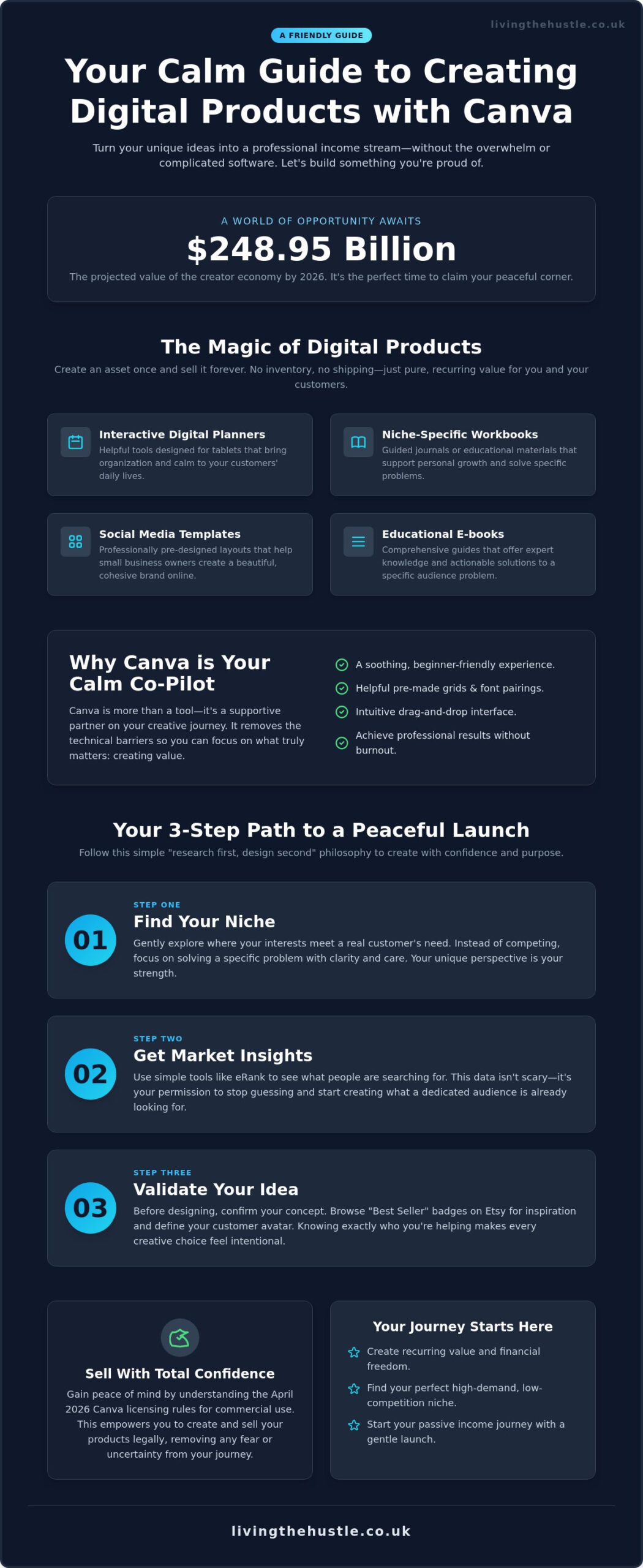
You don't need years of design school to build something beautiful and profitable. With the creator economy reaching a value of $248.95 billion in 2026, there has never been a better time to claim your small, peaceful corner of the market. This guide will show you how to move from “stuck” to “finished” with confidence. We will explore how to choose a niche that feels right, understand the updated April 2026 licensing rules with ease, and use simple templates to create a professional product you're proud to share. Let's walk through this manageable path to passive income together.
Key Takeaways
- Discover how digital assets provide recurring value and financial freedom without the constant stress of managing physical inventory.
- Learn to identify high-demand, low-competition niches by using simple research tools before you even begin the design phase.
- Master the essential steps for how to create a digital product in canva, including choosing correct dimensions and using a “Calm Brand” foundation.
- Gain total confidence in the legalities of your business by understanding the April 2026 licensing rules for commercial use.
- Start your journey toward passive income with a gentle launch strategy that focuses on building a trustworthy brand at your own pace.
The Magic of Digital Products: Why Canva is Your Calm Creator Tool
The dream of building a business often feels like a mountain you aren't prepared to climb. We are frequently told we need to work harder, sleep less, and master complex tools just to keep our heads above water. But what if there was a gentler way? Digital products offer a path to financial stability that doesn't require sacrificing your peace of mind. By creating high-value assets once, you can serve your audience repeatedly without the constant pressure of physical inventory or shipping deadlines.
What Exactly is a Digital Product in 2026?
In its simplest form, Digital goods are items that exist only in electronic format. In 2026, these range from standard PDF guides to interactive Canva template links that your customers can customize for their own needs. Digital products are intangible assets that provide recurring value without inventory stress. Because there is no physical product to restock, your growth is limited only by your imagination; not your storage space.
Common examples of successful digital products in 2026 include:
- Interactive Digital Planners: Tools designed for tablets that help users organize their lives.
- Niche-Specific Workbooks: Guided journals or educational materials for personal growth.
- Social Media Templates: Pre-designed layouts for small business owners.
- Educational E-books: Comprehensive guides that solve a specific problem for your audience.
Why Canva is the Beginner’s Best Friend
Many people hesitate to start because they don't feel like “real” designers. You might look at professional software and feel an immediate sense of overwhelm. This is where the magic happens. Learning how to create a digital product in canva is designed to be a soothing experience rather than a technical hurdle. The platform provides pre-made grids and harmonious font pairings that act like a supportive mentor, guiding your eye toward what looks best. If you're worried about your aesthetic, you can always explore the art of design to build your confidence even further.
The drag-and-drop interface removes the friction that usually stops new creators in their tracks. It's about finding a rhythm that works for you. Instead of fighting with complicated layers or code, you can focus on the value you're providing to your customers. When you understand how to create a digital product in canva, you're not just using a tool; you're adopting a workflow that honors your time and your energy. It's a partner in your creative journey that helps you produce professional results without the burnout associated with traditional hustle culture.
Strategic Research: How to Find Your Profitable Niche Without the Stress
Have you ever spent hours creating something, only to realize nobody was actually looking for it? It's a common frustration that can make you want to give up before you've truly started. The secret to a peaceful business is a “research first, design second” philosophy. By understanding what your audience needs before you open your laptop, you remove the guesswork and the anxiety of low sales. This approach transforms the process of how to create a digital product in canva from a shot in the dark into a confident step forward.
Finding your niche doesn't have to be a high-pressure corporate task. Think of it as a gentle exploration of where your interests meet a customer's needs. Are there specific problems you've solved in your own life? Perhaps you've mastered a unique organization system or found a way to simplify a complex hobby. Looking for these gaps where customers are currently underserved allows you to enter the market with a sense of purpose rather than competition. You don't need to be the only person selling a product; you just need to be the person who solves the problem with the most clarity and care.
Using eRank for Stress-Free Market Insights
Data doesn't have to be scary. Using tools like eRank for Etsy sellers allows you to see exactly what people are typing into search bars. You can identify “low competition” niches where people are searching for solutions but finding very few professional options. This insight gives you permission to stop worrying about the “big players” and focus on a small, dedicated group of people who will truly value your work. It's about finding a manageable corner of the internet where your voice can be heard clearly.
Validating Your Idea Before You Click “Create”
Before you dive into the design phase, take a moment to validate your concept. Browsing Etsy for “Best Seller” badges is a wonderful way to see what's currently resonating with buyers. Don't let this intimidate you. Instead, let it inspire you by showing you what's possible. Ask yourself: who is my Customer Avatar? Are they a busy parent looking for a simple meal planner, or a small business owner needing a cohesive brand kit? When you know exactly who you are helping, your how to create a digital product in canva workflow becomes much more intentional. Every font choice and layout decision will be made with that specific person in mind.
If you're feeling a bit unsure about how to pull your visual identity together, you might find the Blog, Brand & Bloom Workbook helpful for organizing your thoughts and finding your creative rhythm. Taking these small, strategic steps now ensures that when you finally start designing, you're building on a foundation of real demand and quiet confidence.
The Design Workflow: 5 Steps to Creating a Professional Product in Canva
Once you have validated your idea through research, it's time to move into the creative phase. Designing doesn't have to be a frantic race against the clock. In fact, your best work often happens when you approach the canvas with a sense of quiet intention. Learning how to create a digital product in canva is about building a repeatable workflow that protects your energy and ensures a high-quality result for your customers.
Follow these five steps to bring your vision to life:
- Choose Your Dimensions: Start with the end user in mind. If you're creating a printable for a US audience, use “US Letter” (8.5 x 11 inches). For a global audience, “A4” is often the better choice.
- Establish a Calm Brand: Select two or three consistent fonts and a soft, cohesive colour palette. This foundation prevents your design from looking cluttered and helps your brand feel trustworthy.
- Master the Layering Technique: Avoid using single elements exactly as they appear in the library. Combine shapes, lines, and textures to create a unique composition that is entirely your own.
- Perform a Quality Check: Zoom in to 100% to ensure your text is perfectly legible. If your product includes buttons or links, click every single one to verify they lead to the right destination.
- Export with Care: Choose “PDF Print” for items intended for home printing. If you're selling an editable asset, generate a “Template Link” so your customers can open a fresh copy in their own accounts.
Setting Up Your Calm Workspace
A cluttered sidebar leads to a cluttered mind. Before you start, organize your Canva folders by project or product type. This simple habit keeps your creative workspace tidy and saves you from the stress of searching for uploaded files. Using “Brand Kits” is another wonderful way to stay organized. By saving your preferred fonts and colours in one place, you maintain a professional look across every page without extra effort. A tidy workspace leads to a more peaceful design process and allows your creativity to flow without distraction.
The Art of Design: Standing Out in a Crowded Market
In a busy digital marketplace, simplicity is often your greatest strength. Many new creators try to fill every inch of the page, but “white space” is actually a vital design element. It gives your customer's eyes a place to rest and makes your information easier to digest. If you want to dive deeper into these principles, The Art of Design offers wonderful insights into making your products truly pop.
As you explore how to create a digital product in canva, you might also use the platform's 2026 AI features. Current data shows that 76% of creators now use AI for content creation or editing. Use these tools ethically to speed up tedious tasks like background removal or generating initial layout ideas. However, always remember that your unique perspective and heart are what provide the real value to your customers. AI is a helpful assistant, but you are the artist.
Navigating Legalities: Understanding Canva’s Licensing and Commercial Use
Does the thought of legal fine print make you want to close your laptop and hide? It's a very common fear for new creators. You might worry that you'll accidentally break a rule or that your shop will be shut down before it even gains momentum. I want to reassure you right now: yes, it is absolutely legal to sell digital products you've made in Canva. Understanding how to create a digital product in canva also means understanding how to protect your business legally so you can create with a clear and peaceful mind.
The most important rule to remember is the “Standalone Content” policy. Canva's license, which was most recently updated on April 15, 2026, states that you cannot sell their elements exactly as they are. For example, you can't take a single illustration of a flower and sell it as a digital sticker. However, when you combine that flower with your own text, a unique layout, and other design elements, you've created a new, original work. You aren't just selling a single element; you're selling a unique composition that provides value to your customer.
Canva’s Content Licence Simplified
Think of Canva’s library as a box of craft supplies. You can't sell the individual glue sticks or glitter, but you can sell the beautiful scrapbook you made using them. To ensure your shop stays safe, follow these simple guidelines:
- Add Creative Value: Always modify templates significantly. Change the fonts, colours, and layout until the design feels like yours.
- Free vs. Pro Elements: If you use Pro elements in a template link, your customer will need a Canva Pro account to download the file without watermarks. Using Free elements is often the most inclusive choice for your buyers.
- The Template Link Strategy: This is the safest way to sell editable designs. You provide a link that opens a fresh copy in your customer's account, keeping the original elements within Canva's ecosystem.
Quality Assurance for Digital Sales
When you're ready to share your work, don't just send a raw link. Create a “Delivery PDF” that acts as a warm welcome for your customer. This document should include a thank-you note, clear instructions on how to use the product, and the link to their new Canva template. It makes your business look professional and trustworthy from the very first click.
If you're selling a finished product like a planner or e-book, ensure you export it as a “Flattened” PDF. This process merges your design into a single layer, which protects your creative work and ensures the fonts and elements look exactly as you intended on every device. If you're ready to master these professional details and scale your shop, the Template Creators Society is a wonderful place to find support and deeper guidance. Taking these small steps to understand how to create a digital product in canva legally will give you the confidence to grow a sustainable, low-stress business.
Your Path to Passive Income: Launching and Scaling Your Digital Shop
You've taken the brave first step of learning how to create a digital product in canva. Now, it's time to share your work with the world. This phase often feels like the most intimidating part, doesn't it? The fear of “what if nobody buys” can be loud. I want you to take a deep breath. Success in the creator economy, which is valued at $248.95 billion in 2026, isn't about an overnight explosion. It's about a gentle, steady climb that honors your pace and your well-being.
To make your digital files feel real and inviting, use the power of mockups. Canva has wonderful frames and “Smartmockups” that allow you to show your digital planner on a tablet or your workbook on a cozy desk. These visuals help your customers imagine using your product in their own daily lives. It turns an abstract file into a tangible solution. When your mockups look professional and soft, they build immediate trust with your audience.
Remember the keywords we identified during our research phase? This is where they work their magic. By placing those terms naturally in your product titles and descriptions, you're building a bridge between your work and the people who need it. You aren't “shouting” for attention; you're simply making sure you're easy to find. This intentional approach to SEO ensures your shop grows quietly and consistently in the background.
Launching Your Etsy Shop with Confidence
Setting up your shop is a milestone to celebrate. Instead of trying to perfect everything at once, focus on a “Gentle Launch” mindset. Aim to create your first 10 listings to build a sense of momentum. When you write your descriptions, speak directly to your customer's heart. Tell them how your product will make their life easier or more peaceful. While search engines need keywords, humans need connection. By being honest and helpful, you'll find that your first few sales come much more naturally than you might expect.
Scaling with the Template Creators Society
Once you've felt the thrill of that first notification saying you've made a sale, you might feel ready to grow. Scaling doesn't have to mean more stress. It means moving from one-off creations to a cohesive brand that customers return to again and again. If you're ready to turn your passion into a structured business, the Template Creators Society is a supportive space designed to help you scale with confidence.
Stay patient with your progress. Every successful creator started exactly where you are today. By consistently applying what you've learned about how to create a digital product in canva, you're building a foundation for long-term freedom. Trust the process, celebrate the small wins, and remember that your unique voice is your greatest asset in this journey.
Your Journey to a Peaceful and Profitable Future
Building a business doesn't have to mean sacrificing your tranquility. Throughout this guide, we've explored how a “research first” mindset and a clean design workflow can turn your creative ideas into high-value assets. You now understand the April 2026 licensing updates and the simple steps to how to create a digital product in canva that truly resonates with your audience. By focusing on solving specific problems and using a gentle launch strategy, you're creating a foundation for sustainable growth that lasts.
If you're ready to move forward with a supportive mentor by your side, I invite you to Join the Passive Income Society and start your calm business journey today. Our community offers step-by-step beginner friendly modules designed specifically for those who want to build a profitable shop without the overwhelm. We focus on sustainable, low-stress growth and manageable milestones that fit into your real life. You have the talent and the tools; now it's time to let your creativity bloom. I am so excited to see what you build.
Frequently Asked Questions
Can I sell Canva templates on Etsy legally?
Yes, you can absolutely sell designs made in Canva on Etsy. The key is to ensure you are creating an original design rather than reselling a Canva-provided template without changes. According to the April 2026 license update, as long as you add your own creative value and unique layout, you have the right to sell your finished work. This is a vital part of learning how to create a digital product in canva with confidence.
Do I need Canva Pro to create digital products to sell?
You don't need a paid subscription to get started. The Canva Free plan costs $0 and provides over 1.6 million templates and 5GB of storage, which is plenty for a beginner. While Pro offers extra features, starting for free allows you to build your business at a peaceful pace without any initial financial pressure. You can always upgrade later as your shop grows and your needs change.
What are the best-selling digital products in 2026?
In 2026, the most successful products are those that solve specific, time-sensitive problems. High-demand items include niche-specific AI prompt libraries, audit templates for small businesses, and specialized workflow planners for platforms like Notion or Canva. Research shows that 76% of creators now use AI tools to help streamline these practical, time-saving products. Focus on a narrow niche where you can provide real, tangible value to a dedicated audience.
How do I deliver the digital product to my customer on Etsy?
The most professional and gentle way to deliver your work is through a “Delivery PDF.” You upload this PDF to your Etsy listing, and the customer downloads it immediately after purchase. Inside the PDF, include a warm welcome note and a clear link to your Canva template or finished file. This ensures your customer feels supported and knows exactly how to access their new purchase without any technical confusion.
Can I use Canva elements in my digital designs for sale?
Yes, you can use Canva’s elements, but they must be part of a larger, unique composition. You cannot sell a single element as “standalone content,” such as a single graphic sold as a clip-art file. However, when you combine graphics, text, and your own layout, you create a new work that is legal to sell. This creative layering is the secret to how to create a digital product in canva that is truly your own.
What is the best format to save my digital products in?
The best format depends on how your customer will use the product. For items meant to be printed, like journals or wall art, “PDF Print” provides the highest quality. If you are selling an editable asset, the “Canva Template Link” is the industry standard. This allows your customer to open a fresh copy in their own account, ensuring they don't accidentally edit your original file while keeping the design process simple for everyone.
How much money can a beginner make selling Canva products?
Earnings vary based on your niche and how much time you choose to invest. While the creator economy is valued at $248.95 billion in 2026, it's important to remember that most successful shops grow steadily over time. Only 4% of creators earn over $100,000 annually, but many beginners find that focusing on a specific, underserved niche leads to a reliable and peaceful source of secondary income. Consistency and patience are your best friends.