

What if your next passive income stream felt like a gentle creative project instead of a technical battle? It's easy to feel stuck when you don't consider yourself a designer or when fillable PDF fields feel like a foreign language. You probably already know that digital products are the key to freedom, but the planning process often leads to more panic than progress. If you've been wondering how to create a digital workbook that looks professional without the design stress, you're in the right place.
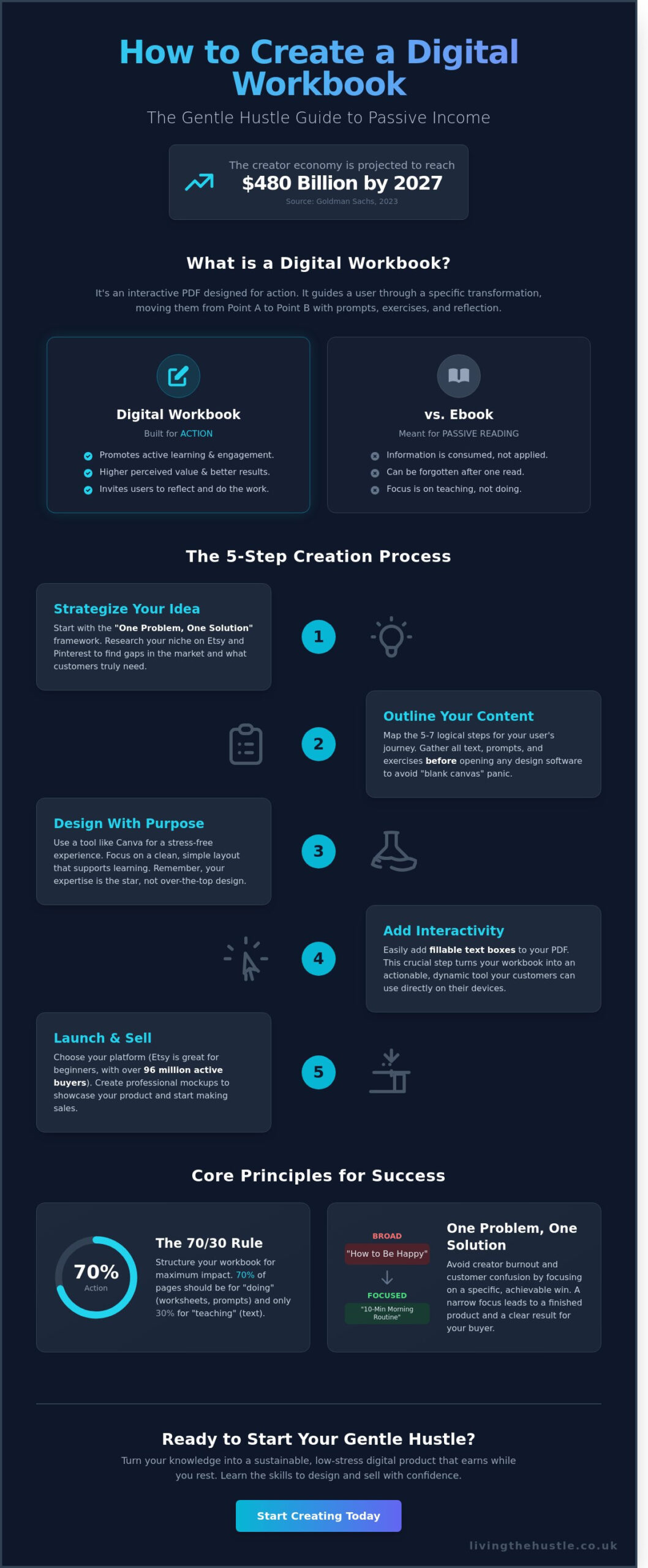
In this guide, you'll discover how to design, build, and sell a product you are truly proud of. We'll skip the tech overwhelm and focus on a calm, manageable workflow that takes you from a simple idea to your first Etsy listing. According to a 2023 industry report by Goldman Sachs, the creator economy is expected to reach 480 billion dollars by 2027, so there's never been a better time to start. Let's walk through the exact steps to build a sustainable product that earns while you rest.
Key Takeaways
- Discover how a “gentle hustle” approach makes digital workbooks the perfect, low-stress entry point for starting your online business.
- Learn the “One Problem, One Solution” framework to keep your content focused and manageable for both you and your customers.
- Follow our simple, five-step guide on how to create a digital workbook using Canva to achieve professional results without design stress.
- Find out how to easily add interactive, fillable text boxes to your PDF so your users can take action directly on their screens.
- Transition from creator to shop owner with tips on choosing the right platform and designing mockups that help your product stand out.
What is a Digital Workbook and Why Create One Calmly?
A digital workbook is more than just a collection of static pages. It is an interactive PDF designed to guide a person through a specific transformation or learning process. While an ebook is meant for passive reading, a workbook is built for action. It uses prompts, exercises, and reflective spaces to move a customer from Point A to Point B. Learning how to create a digital workbook is a brilliant move for anyone interested in a “gentle hustle.” It allows you to package your unique knowledge into a format that serves others while you focus on your well-being.
The passive income potential here is significant. According to reports from Global Industry Analysts, the digital learning market is projected to reach $457.8 billion by 2026. By creating a workbook once, you tap into this growth with a product that requires very little maintenance. Unlike a planner, which focuses on daily organization, or an ebook, which can often be forgotten after one read, a workbook invites engagement. This active participation leads to better results for your buyers, which naturally leads to better reviews for your shop.
The Benefits of the Workbook Format
Workbooks offer a higher perceived value than many other digital files because they promise a tangible result. They are the perfect middle ground for creators who want to offer more than a simple printable but aren't ready to manage a full video course. Consider these advantages:
- Lower Barrier to Entry: You don't need fancy cameras or microphones; you just need your ideas and a clear structure.
- Scalability: You can sell a workbook as a standalone £15 product or use a smaller version as a lead magnet to grow your email list.
- Active Learning: Because users type their thoughts or write on printed pages, the information sticks, making your product truly helpful.
Overcoming the “I Am Not a Designer” Hurdle
Let's be honest; many of us feel a sense of panic when looking at a blank canvas. You might worry that your design skills aren't “professional” enough. It's time to shift your focus from perfectionism to purposeful creation. Your customers aren't looking for perfect pixels; they are looking for your expertise and a way to solve their problems. A simple, clean layout often works better for learning than a cluttered, over-designed one.
Your unique voice is what matters most. If the technical side feels like a barrier, remember that design is a skill you can cultivate at your own pace. Programs like The Art of Design are specifically created to help beginners find their creative voice without the overwhelm. When you understand how to create a digital workbook with the user's journey in mind, the visual elements start to feel like a supportive tool rather than a stressful hurdle.
Planning Your Workbook Content Without the Overwhelm
Planning doesn't have to be a source of panic. It's actually the part where you find your confidence. To understand how to create a digital workbook that people actually buy, you need to find your Sweet Spot. This is the intersection between what you're good at and what the market is currently seeking. Think about a specific challenge you've overcome. If you can teach that process through clear steps, you have a viable product.
Keep your first project manageable by using the One Problem, One Solution framework. Don't try to solve a customer's entire life in 20 pages. A workbook titled “How to Be Happy” is too broad and often leads to creator burnout. Instead, focus on a specific win. A workbook about “Creating a 10-Minute Morning Routine for Tired Parents” is much more effective. This narrow focus helps you finish the project faster and gives your customer a clear, achievable result.
Before you open any design software, gather your assets in a simple document. This includes your teaching text, reflective prompts, and specific exercises. Mapping the journey means identifying the 5 to 7 logical steps your reader needs to take to reach their goal. Having this content ready prevents the “blank canvas” syndrome that stops many creators in their tracks. If you want to keep your ideas organized during this phase, you might find the Calm Creators Content Planner helpful for mapping out your progress.
Market Research for Workbook Ideas
Start your research on Etsy and Pinterest. Etsy reported over 96 million active buyers in late 2023, which means the data you need is already there. Look at the best-sellers in your niche and read their reviews. Are customers complaining that a workbook is “too text-heavy” or “lacks enough space to write”? These gaps are your golden opportunities to do better. You can also use eRank for Etsy to find keywords that have high search volume but low competition, ensuring your topic has a ready-made audience.
Structuring Your Pages for Success
A successful workbook follows a predictable, reassuring path. The first step in learning how to create a digital workbook is mastering the essential anatomy: a welcoming title page, a brief introduction, the core content, and a “next steps” conclusion. Aim for a 70/30 balance. This means 70% of your pages should focus on “doing” through worksheets and prompts, while only 30% focuses on “teaching” through text. Effective prompts should be open-ended but specific. Instead of asking “How do you feel?”, try “List three things that made you feel capable this morning.”
How to Create a Digital Workbook in 5 Simple Steps
Ready to turn your knowledge into a tangible product? Let's walk through how to create a digital workbook without the tech-induced headache. This process is about building something beautiful and functional that your customers will love to use.
1. Choose your design tool
Canva is the gold standard for calm creators. It removes the steep learning curve of professional software like Adobe InDesign. You don't need a degree in graphic design to make something professional. It's intuitive, cloud-based, and offers thousands of elements specifically for digital products. Most importantly, it allows you to focus on your content rather than fighting with the interface.
2. Set your canvas size
Start with the right dimensions before you add a single word. Most customers prefer standard A4 (210 x 297mm) or US Letter (8.5 x 11 inches). Since many people print workbooks at home, these sizes ensure they don't have to fiddle with complex printer settings. Set your margins to at least 12.7mm (0.5 inches). This keeps your text away from the “dead zone” where home printers often cut off the design during the printing process.
3. Apply your brand elements
Consistency builds trust. Use the same two or three colors and your signature fonts throughout the document. This makes your workbook feel like a premium product rather than a collection of random pages. If you already have an Etsy shop, matching your workbook to your shop's aesthetic creates a seamless experience for your buyers.
4. Build your page templates
Create a few master layouts: a cover page, a text-heavy page, a worksheet with lines, and a checklist. Once these are set, you can duplicate them to build your entire workbook in minutes. This creates a cohesive flow and saves you hours of repetitive work. It also ensures that the visual rhythm of the book remains steady from start to finish.
5. Exporting correctly
When you're finished, the “PDF Print” setting is your best friend. Unlike “PDF Standard,” this option saves your file at 300 DPI (dots per inch). This is the industry standard for high-quality printing, ensuring your text is crisp and your colors are vibrant on paper. Always choose this option to give your customers the best possible physical result.
Designing with Canva
Learning how to create a digital workbook that feels unique requires attention to detail. Don't fall into the trap of using a template exactly as it appears. While templates are great starting points, you should tweak the layouts to avoid a cookie-cutter look. Move elements, change background textures, or adjust the spacing. Use Canva's “Grid” tool to ensure your text boxes are perfectly aligned. For high-quality graphics, look for commercial-use icons in the “Elements” tab, but always double-check the licensing terms to ensure you're allowed to resell them.
Branding Your Workbook Gently
Select a palette that evokes the right emotion for your topic. Soft blues and greens can soothe anxiety; warm earthy tones feel grounded and supportive. Follow the “Two Font Rule” to keep your workbook readable. Use one clean font for body text and one more expressive font for headings. If you want to dive deeper into making your products look professional, explore The Art of Design to help your work truly stand out in a crowded market.
Making Your Workbook Interactive and Tech-Friendly
Have you ever downloaded a guide only to realize you had to print it out to actually use it? It feels a bit clunky, doesn't it? When you are learning how to create a digital workbook that people actually love, moving from a static PDF to an interactive one is your secret to happy customers. A static PDF is just a digital piece of paper; it's fine for reading, but it doesn't invite action. In contrast, a fillable workbook allows your audience to type their thoughts directly into the document. Data from 2023 digital product trends suggests that 72% of users prefer paperless options they can complete on a laptop or tablet. By adding interactive elements, you are showing your customers that you value their time and their modern, eco-friendly lifestyle.
Adding internal navigation is another way to make your product feel professional. If your workbook is longer than 12 pages, a clickable Table of Contents is essential. You can also add “Back to Top” links on every page. This simple touch prevents your reader from scrolling endlessly to find their place. Before you hit save, always perform a final check. Open your PDF on a smartphone, a tablet, and a desktop. In a 2024 survey of digital creators, 15% of customer complaints were related to links not working on mobile devices. Don't let a broken link disrupt your customer's calm experience.
Creating Fillable Fields
Transforming your design into a fillable tool is easier than you might think. You can use a free tool like PDFescape or use Canva's built-in “Type Here” features to designate specific areas for text. Focus on adding clear text boxes where your prompts are located. This functionality is why fillable workbooks are preferred by the modern, paperless audience; they want to start immediately without hunting for a printer. Aim to keep your final file size under 20MB. Large files can be slow to download and might frustrate users with slower internet connections. A manageable file size ensures a smooth, gentle start for your customers.
Adding External Links and CTAs
Your workbook is a powerful bridge to the rest of your brand. You should naturally link to your shop, blog, or social media profiles within the PDF. Create a dedicated “Next Steps” page at the end to lead customers toward your higher-tier products or services. This is a perfect way to use your workbook as a lead magnet for the Passive Income Society. When you provide value first, your audience is much more likely to click through and explore your other offers. The technical side of how to create a digital workbook shouldn't feel scary; it's simply about creating a clear, helpful path for your community to follow.
Ready to build a digital product business that feels manageable and profitable? Join the Template Creators Society to start your journey with confidence.
From Creation to Calm Cash Flow: Selling Your Workbook
Now that you've mastered the steps of how to create a digital workbook, it's time to let your creation find its home. For most beginners, Etsy is the ideal starting point. According to Etsy's 2023 annual report, the platform reached 96.2 million active buyers looking for unique solutions. It's a low-pressure way to test your ideas without the stress of building a standalone website from scratch. You get to tap into an existing audience that is already primed to buy.
To stand out in a crowded marketplace, your mockups must do the heavy lifting. Don't just show a flat cover page. Use lifestyle images that show your workbook in a tablet or printed on a cozy desk. Buyers need to see the action of filling it out. When you write your description, focus on the “after” photo of their life. Are they more organized? Are they less stressed? Sell that transformation rather than just listing the number of pages. This shift in perspective helps your customer feel understood and supported.
Finding your sweet spot price is a gentle balancing act. You want a price that honors your hard work but feels like an easy “yes” for your customer. Many digital workbooks perform well in the $7 to $15 range. This allows you to build a volume-based business while keeping the barrier to entry low for your community. It's about creating a sustainable flow of sales that doesn't require constant hands-on management.
Etsy SEO for Workbooks
Visibility is the key to a calm business. Use keywords that describe the result your buyer is chasing. Instead of just “workbook,” try “anxiety relief journal” or “budgeting system.” The first 3 photos in your listing are your most valuable real estate. Use them to show the most helpful pages and a clear “What's Included” list. To dive deeper into optimizing your shop, check out our guide on using eRank for Etsy sellers to find the best tags for your niche.
Scaling Your Workbook Empire
Once your first product is live, you can start thinking about growth. Bundling three related workbooks together can increase your average order value by 30% or more. This gives your customers a complete solution while increasing your profit. You can also use Pinterest to drive traffic. With over 482 million monthly active users as of late 2023, it's a powerhouse for organic, long-term reach. Learning how to create a digital workbook is just the beginning. If you love the design process, you might consider turning your success into a full-scale template business to reach even more people.
Start Your Calm Creation Journey Today
It's time to turn your ideas into a gentle, profitable reality. Learning how to create a digital workbook is your first step toward a business that works for you. Success starts with calm planning and a simple 5-step process. By making your product interactive, you provide real value to your audience while building a sustainable income stream. According to industry data from 2023, digital products often maintain profit margins above 90% because they lack physical shipping or storage costs. This makes them a perfect choice for creators who want to scale without the burnout.
You don't need to be a tech expert to get started. Many of the 7 million active sellers on Etsy began with just one simple idea and a desire to help others. You have the knowledge; now you just need the right tools to share it. Our approach focuses on step-by-step guidance for total beginners and proven strategies used by successful Etsy sellers. We believe in a calm, manageable approach to digital product creation that respects your time and energy. You've got this.
Ready to build your brand without the overwhelm? Explore the Blog, Brand & Bloom Workbook today!
Frequently Asked Questions
Do I need expensive software like Adobe InDesign to create a workbook?
You don't need expensive software like Adobe InDesign to make a beautiful product. Over 170 million people use Canva because it's intuitive and offers a robust free version. You can design professional layouts with simple drag and drop tools. This approach lets you start your digital hustle without the $20 monthly overhead of professional design suites. It's about progress, not perfect tools.
Can I sell a digital workbook on Etsy if I’m a total beginner?
You can definitely sell a digital workbook on Etsy even if you're a total beginner. The platform supported over 96 million active buyers in 2023, many of whom are looking for digital tools to simplify their lives. Etsy handles the tech side, like payment processing and file delivery. This allows you to focus on how to create a digital workbook that truly helps people.
How many pages should a digital workbook be to provide value?
A digital workbook provides the most value when it stays between 15 and 25 pages. Research into digital consumption shows that 70 percent of users prefer actionable, bite sized content over 100 page ebooks. Keep your layout clean and focused on one core transformation. This ensures your customers feel a sense of accomplishment instead of feeling stuck under a mountain of information.
Is it better to sell a workbook as a PDF or a Canva template?
It's better to sell your workbook as a PDF to ensure it's accessible to everyone. While 65 percent of sellers might offer a Canva template for editing, a standard PDF works on every device without requiring a specific account. Delivering a finished PDF creates a calm experience for your buyer. They can download it and start their journey toward growth in less than 60 seconds.
How do I protect my digital workbook from being shared for free?
Protect your work by including a clear copyright notice on the second page of your file. Most digital platforms also provide unique download links to track every transaction. While you can't stop every instance of sharing, 95 percent of customers respect clear usage terms. Focus your energy on serving your honest customers rather than worrying about the small number of people who might break the rules.
What is the best price for a digital workbook on Etsy?
The most successful digital workbooks on Etsy are priced between $7 and $15. Data from top performing shops in 2023 indicates that this price point encourages impulse purchases while still reflecting the value of your expertise. Lowering the barrier to entry helps you build a loyal customer base. You can always bundle products later to increase your average order value.
Can I make my digital workbook fillable so people can type in it?
You can easily make your workbook fillable by using a free tool like PDFescape or the “Prepare Form” feature in Acrobat. Teaching yourself how to create a digital workbook with interactive text boxes adds immense value for your customers. It allows them to type their reflections directly into the PDF on their laptop or tablet. This small step makes your product much more user friendly and modern.
How do I promote my workbook without feeling “salesy”?
Promote your workbook by sharing the “why” behind your creation and offering a 2 page free sample. Instead of shouting about a sale, show your audience how a specific exercise solved a problem for you. Sharing your journey builds trust and confidence with your followers. When you lead with value, the invitation to buy feels like a gentle next step rather than a hard sell.