

What if you could stop emailing files to customers at 2:00 AM and finally build a business that runs itself while you sleep? If you're tired of the manual hustle, you've likely heard of templett but felt a bit of tech overwhelm just thinking about the setup. It's completely normal to feel stuck between wanting a professional shop and fearing the learning curve that comes with new software. You want more time for creating and less time on admin, but the path forward isn't always clear.
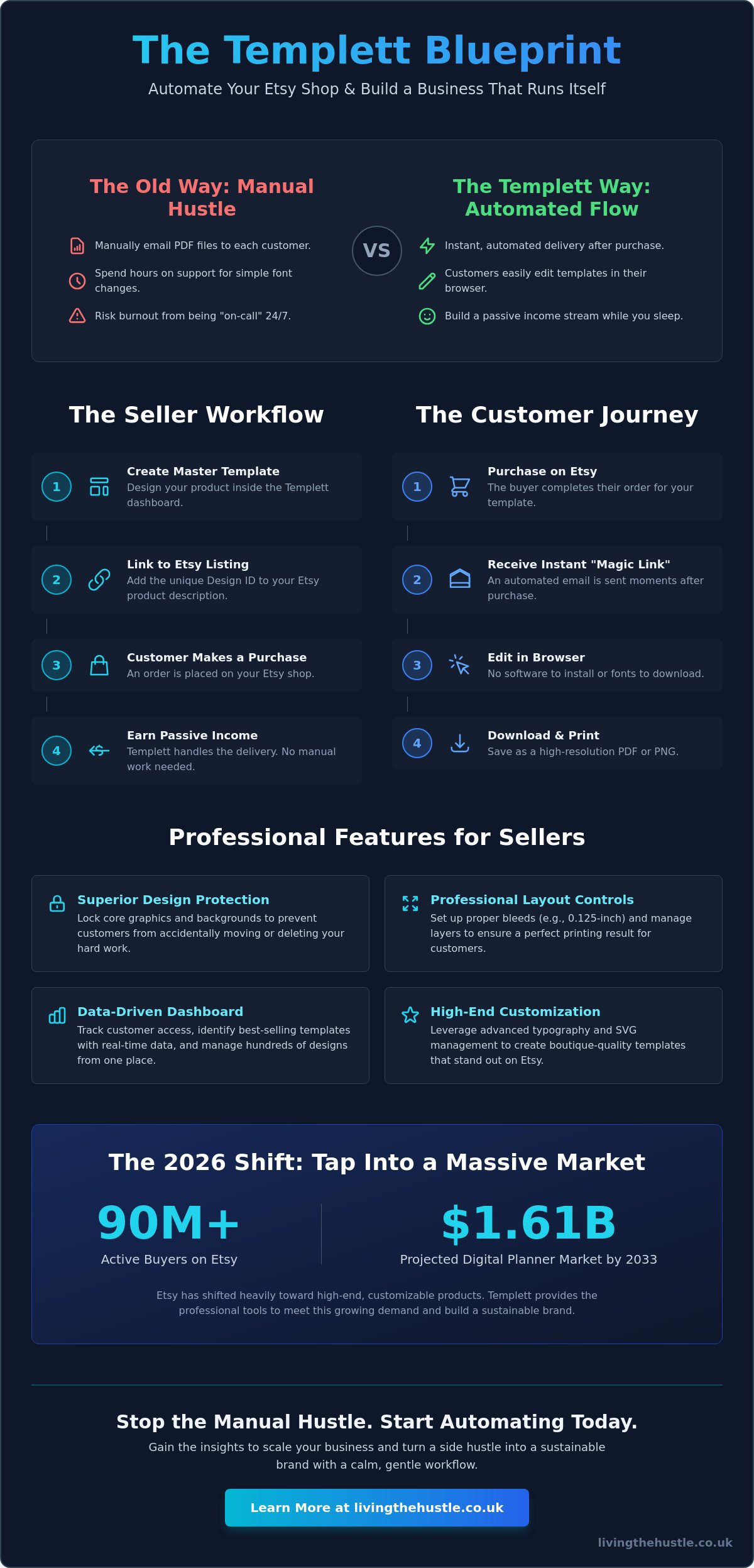
We agree that your creative business should feel like a source of joy, not a never-ending list of manual tasks. This guide will help you discover how to use this tool to build a professional, automated digital product business on Etsy without the panic. We'll show you how to reach Etsy's 90 million active buyers and tap into a digital planner market projected to hit at least $1.61 billion by 2033. From comparing the $9 starter plan to Canva's features to setting up your first automated delivery, we're breaking down the exact steps to help you sell with confidence.
Key Takeaways
- Understand how templett acts as a professional bridge between your creative designs and your customer's need for easy customization.
- Learn to set up a seamless, automated workflow that delivers your templates instantly, giving you back hours of your day.
- Explore the specific features that provide superior design protection and professional layout controls for your boutique stationery.
- Follow a simple, step-by-step process to link your Etsy shop and launch your first profitable template listing with confidence.
- Gain the insights needed to scale your business by using data-driven stats and niche strategies that turn a side hustle into a sustainable brand.
What is Templett? Defining the Professional Standard for Etsy Templates
Let's be honest, the old way of selling digital files was often a recipe for burnout. You would create a PDF, hope the customer liked it, and then spend your weekends answering emails from people who couldn't figure out how to change a font. templett changed that game entirely. It is a browser-based design platform built specifically for Etsy sellers who want to sell editable templates without the tech headache. Unlike a static PDF that requires expensive software to tweak, this tool lets your buyers customize their designs directly in their web browser.
The real magic lies in the automation. When someone buys from your shop, the system handles the delivery instantly. This frees you up to focus on the creative side of your business instead of being stuck in an endless loop of customer support. It is a game-changer for anyone selling digital goods in competitive niches like wedding stationery, party printables, or small business branding. If you're ready to dive into a specific niche, you can explore Party Printable Profits to see how these automated systems create a sustainable income stream.
How Templett Bridges the Gap Between Designer and Customer
Once a customer completes their purchase on Etsy, they receive a “magic link” via email. This link takes them straight to their template. They don't need to download fonts or install Photoshop. This hands-off approach means no more manual emailing of files at midnight. It builds immediate customer confidence because they have access to professional-grade editing tools without the technical headache. You provide the design, and they provide the details; it's a perfectly balanced partnership.
Why 2026 is the Year to Start with Templett
As of May 2026, the Etsy marketplace has shifted heavily toward high-end, customizable products. Buyers are looking for that personal touch but expect a polished, professional experience. The templett platform has evolved significantly to meet this demand, now supporting complex design features like advanced typography and SVG management that weren't possible a few years ago. This ensures your products look like they came from a high-end design boutique rather than a generic template shop. Templett is an automated SaaS solution that empowers creative entrepreneurs to build a scalable business with a calm, gentle workflow in 2026.
The Seller Workflow: How Templett Automates Your Passive Income
The back-end experience is where the real magic happens. Instead of juggling messy folders on your hard drive, the templett dashboard acts as your central command center. You can see exactly when a customer has accessed their file; this helps you troubleshoot if someone claims they didn't get their link. Connecting your Etsy shop is a simple, one-time task using an API key. Once linked, the two platforms communicate perfectly behind the scenes. When an order is placed, the system automatically recognizes the unique Design ID you've added to your Etsy listing and triggers the delivery email. It's a seamless loop that requires zero manual intervention from you.
Monitoring your shop performance becomes much easier when everything is in one place. The dashboard provides clear stats on your most popular designs and customer interactions. If you notice a specific wedding invitation is getting 40% more clicks than your others, you can lean into that trend. This data-driven approach removes the guesswork and helps you focus your creative energy where it matters most. Using this dashboard effectively allows you to:
- Track customer access to prevent “lost file” emails.
- Manage hundreds of designs without getting lost in the tech.
- Update a master design once and have it reflect across your listings.
- Identify your best-selling templates with real-time data.
Creating Your First Master Template
Setting up your canvas correctly is the foundation of a professional product. For a standard 5×7 invitation, you should always include a 0.125-inch bleed to ensure perfect printing results for your customers. Organizing your layers is equally important for a smooth user experience. You have the power to lock specific elements, such as your core brand graphics or intricate botanical backgrounds. This prevents customers from accidentally moving or deleting your hard work while still giving them the freedom to edit their text. When they finish their masterpiece, they can choose “Save for Print” to get a high-resolution PDF or “Save for Web” for a quick PNG. This level of control is what helps you build and scale a digital template business with total confidence.
The Customer Journey: From Purchase to Print
Imagine the relief of knowing your customer has everything they need the second they click “buy.” Immediately after their purchase, they receive an automated email from the templett system. There's no password to remember and no complex software to download. They simply click their unique link and enter a simplified editing interface designed to prevent “buyer overwhelm.” They can change colors, swap fonts, and move text boxes in a way that feels intuitive and fun. By removing these technical barriers, you've created a calm experience for them and a truly passive income stream for yourself. This automation is the heartbeat of a sustainable, gentle business model that lets you enjoy your life while your shop works for you.
Templett vs. Canva: Which is Better for Your Etsy Shop?
Choosing the right tool for your creative business shouldn't feel like a high-stakes gamble. While Canva is a brilliant generalist design tool, templett is a specialist platform built for template delivery. It's the difference between using a handy multi-tool and a laser-guided scalpel. Many sellers start with Canva because it's familiar, but as your shop grows, you might find yourself craving more control and security. This is where moving to a dedicated system can replace your tech overwhelm with a sense of calm and professional confidence.
The “Pro” factor in this comparison comes down to precision. This platform offers advanced typography and layout controls that are essential for high-end stationery. You can manage complex glyphs, precise line spacing, and detailed grids that ensure your designs look perfect every time they're printed. If you've ever struggled to get a text box just right in a general design app, you'll appreciate the specialized focus here. It's designed to make your products look like they came from a boutique design house, not a generic template factory.
Licensing and security are perhaps the most significant differences. When you share a Canva template link, you're essentially handing over a key that can be shared or copied easily. In contrast, templett protects your original elements by requiring a verified Etsy purchase before a customer can access the editor. This ensures your intellectual property remains safe. You also have the power to set download limits and expiration dates, giving you total control over how your digital products are used long after the sale is complete.
Let's look at the costs as of May 2026. While Canva Pro is a flat monthly fee, this platform uses a subscription plus transaction model. The Starter Plan is $9 per month with a $0.79 transaction fee. If you're a high-volume seller, the Pro Plan at $29 per month reduces that transaction fee to $0.49. Both plans offer a 7-day free trial, so you can test the waters without any financial pressure. It's an investment in a specialized workflow that pays off in saved time and reduced admin stress.
When to Choose Templett
This is the ideal choice if you specialize in wedding invitations, funeral programs, or detailed event stationery. You should choose this platform when you're ready for a “set it and forget it” workflow that handles delivery while you sleep. To truly elevate your shop's aesthetic, you can Learn to create digital products that truly stand out. It's for the seller who wants to offer a premium, boutique experience to every customer.
When Canva Might Be Enough
Canva is often a great starting point for simple social media templates, basic digital planners, or simple checklists. It has a lower barrier to entry for total beginners who are working with zero budget and don't need advanced printing controls. While templett offers professional control and design protection, Canva focuses on accessibility and quick, casual creation.
How to Set Up Your First Templett Listing on Etsy
Ready to take that first gentle step toward automation? Setting up your first listing is much simpler than it sounds. First, sign up for a templett seller account; you can start with a 7-day free trial to get comfortable with the interface before committing. Once you're logged in, link your Etsy shop through the settings menu using your unique API key. Next, create your masterpiece in the editor. Every design you save is assigned a unique Design ID. You'll need this specific number to tell the system which template belongs to which Etsy customer, so keep it handy.
Now, head over to Etsy to create your listing as you normally would. Instead of uploading a finished invitation or flyer, you will upload a simple “How it Works” PDF as your digital download file. This sheet should explain that the customer will receive an email with their access link. Finally, add that unique Design ID to your Etsy listing description or tags. This tiny string of numbers is the bridge that automates your entire business, allowing you to step back and focus on your next creation.
Creating Mockups that Sell
Your photos act as your silent salesperson. Since you're selling a digital experience rather than a physical item, your mockups must clearly show the editable nature of the product. Use a “laptop” or “tablet” mockup to signal that the text and colors can be changed. In 2026, buyers are moving toward authenticity and comfort, so choose tactile, textured backgrounds that feel warm and inviting. To ensure your shop looks professional from day one, you can explore the Best Etsy seller tools for 2026 to help you stay ahead of the curve.
Writing Descriptions for Editable Products
Clarity is the antidote to customer confusion. Use primary keywords like “instant download,” “editable template,” and templett naturally in your first few sentences to help with search visibility. Be very specific about what can and cannot be edited. If the floral graphics are locked to protect your licensing, state that clearly in the text. This honesty builds trust and ensures a calm purchase experience for your buyer. You want your customer to feel confident that they can achieve the look they want without any technical panic. If you're looking to find the perfect keywords for your new niche, you might want to learn how to use eRank for Etsy sellers to boost your shop's visibility.
Scaling Your Template Business with Confidence
Once your first few sales roll in, you'll feel a wonderful shift in your confidence. The tech overwhelm begins to fade, and you start to see the real potential of your shop. Scaling a business isn't about working more hours; it's about refining your strategy so your systems do the heavy lifting. The power of niche-ing down is the secret weapon here. While generic shops struggle to be seen, specialized shops like those focused on Party Printable Profits often outperform the competition because they speak directly to a specific customer's needs.
Your templett dashboard is a goldmine for growth. Use the built-in stats to see which designs are most popular and which ones aren't hitting the mark. If a specific floral wedding set is responsible for 60% of your revenue, that's a clear signal to create more items in that style. This data-driven approach allows you to move from a “hustle” mindset to a “CEO” mindset. You're no longer just guessing; you're making informed decisions that protect your passive income and your time. Building a brand that exists beyond just an Etsy listing ensures your business remains stable even if marketplace trends shift.
Joining a Community of Like-Minded Creators
Why spend months trying to figure everything out alone when you can follow a proven path? Mentorship is the fastest way to bridge the gap between where you are and where you want to be. Staying updated on 2026 Etsy trends, such as the shift toward textured, nature-inspired art, is much easier when you're part of a supportive group. If you're ready for deeper guidance, you can join the Template Creators Society: Build, Sell, and Scale. It's a space designed to help you grow with purpose, not panic.
Your Next Gentle Step
Don't let the fear of perfection hold you back. Start with just one design and master the templett-to-Etsy workflow until it feels like second nature. A finished listing that is “good enough” is always better than a perfect design that never gets published. You have the tools and the talent to build something beautiful. When you're ready to turn your templates into a full-time income, come and Join the Passive Income Society. We'll be there to support you every step of the way as you build a business that brings you both profit and peace.
Start Your Calm Creative Journey Today
You now have the roadmap to move from manual, repetitive tasks to a system that works while you rest. By choosing specialized automation, you've replaced late-night file deliveries with a professional workflow that scales with ease. You've seen how templett protects your original designs and provides the precision needed for high-end digital products. This shift from a hustle mindset to a CEO mindset is your first step toward true creative freedom.
Success on Etsy in 2026 isn't about working harder; it's about working smarter with the right tools and community. Trusted by thousands of Etsy sellers, our community offers the step-by-step guidance beginners need to thrive without the panic. We focus on calm, sustainable business growth that respects your time and your well-being. Your dream shop is within reach, and you don't have to build it alone.
Ready to build your template empire? Join the Template Creators Society today!
Take that first gentle step today. We can't wait to see what you create.
Frequently Asked Questions
Do my customers need a Templett account to edit their purchase?
Yes, your customers will create a free account when they first access their “magic link.” This is a quick, one-time process that ensures their progress is saved securely in the cloud. It allows them to come back and finish their edits later without losing any of their work. This professional setup gives them confidence that their personal details and designs are safe and accessible whenever they need them.
Can I use Templett on a mobile phone or tablet?
No, the editing platform is designed specifically for desktop or laptop browsers. While customers can view their designs on a mobile device, they need a computer to make actual changes. This ensures they have full access to the professional layout tools and typography controls without the frustration of a small screen. Being clear about this in your Etsy description helps manage expectations and keeps your customer experience calm.
Is there a monthly fee for using Templett as a seller?
Yes, there is a monthly subscription fee separate from transaction costs. As of May 2026, you can choose the $9 per month Starter Plan or the $29 per month Pro Plan. The Pro option reduces your transaction fees from $0.79 to $0.49 per sale. Both plans offer a 7-day free trial so you can explore the features without any immediate pressure. It's a gentle way to test the system before you commit.
Can I sell Templett designs on my own website, or just Etsy?
You can sell your designs on Etsy, Shopify, and WooCommerce. The templett system uses API integrations to connect with these different platforms seamlessly. This flexibility allows you to build a multi-channel business and protect your income by not relying on a single marketplace. It's a great way to grow your brand with total confidence while keeping your automated delivery system exactly the same across all shops.
How do I protect my designs from being stolen on Templett?
The platform protects your work by requiring a verified purchase before granting access to the editor. Unlike simple template links that can be shared freely, each customer gets a unique link tied to their specific order. You can also set specific download limits or expiration dates for each file. This level of security ensures your intellectual property stays in your hands while you focus on the joy of creating.
What happens if a customer loses their access link?
Customers can retrieve their own links through a dedicated recovery portal, or you can resend them instantly from your seller dashboard. This automated system means you don't have to spend your weekends answering “where is my file” emails. It provides a methodical way to handle support, keeping your business manageable and stress-free. In 95% of cases, customers can solve the problem themselves without ever needing to message you.
Can I use my own fonts and graphics in Templett?
Yes, you have the freedom to upload your own custom fonts, SVG graphics, and PNG elements. This is essential for creating a signature look that sets your shop apart from the competition. Just remember that you must hold the correct commercial license for every element you upload to the templett editor. Using your unique assets helps you build a professional brand that truly stands out and attracts your ideal customers.
Is Templett better than Canva for wedding invitations?
It is often considered superior for wedding invitations because of its specialized print features. You can set a precise 0.125-inch bleed and manage complex typography in ways that general design tools often struggle with. For high-end stationery that requires perfect printing, this platform offers the professional control that sophisticated brides and event planners expect in 2026. It ensures the final product looks exactly as beautiful on paper as it does on the screen.