

Imagine waking up to three new sale notifications, only to feel a pit in your stomach because you're worried the files won't download correctly. It's a common fear for many creative entrepreneurs. You've spent hours designing something beautiful, but the technical side of Etsy's 20MB file limit or the thought of a frustrated customer can make your passive income feel anything but peaceful. You aren't alone if the logistics of file delivery feel like a hurdle standing between you and your dream business.
Finding the best way to deliver digital products on etsy shouldn't require a computer science degree or a stressful weekend spent troubleshooting. You deserve a system that works while you sleep, ensuring your customers get exactly what they paid for without a single “help” email. Mastering these logistics is the first step toward a truly sustainable side project that respects your time and your peace of mind. It's about creating a professional “unboxing” experience that builds trust from the very first click.
In this guide, we'll explore how to bypass file size restrictions and set up a professional, automated delivery process that keeps your reviews high and your stress levels low. We'll walk through the exact steps to turn your digital shop into a set and forget system that delights every buyer.
Key Takeaways
- Discover how Etsy’s automated system handles the heavy lifting so your customers receive their files instantly without you lifting a finger.
- Learn why specific formats like PDF and PNG are your best friends for creating a professional and reliable download experience.
- Master the “PDF Link Method,” a simple and effective workaround that is the best way to deliver digital products on etsy when dealing with large file sizes.
- See how a simple instruction guide can transform a basic delivery into a branded experience that delights your customers and earns glowing reviews.
- Gain the confidence to build a scalable, passive system that lets your shop run smoothly while you enjoy your daily life.
Understanding Etsy’s Built-in Digital Delivery System
Selling digital goods feels like magic compared to shipping physical items. You don't have to worry about bubble wrap, postage stamps, or trips to the post office. When you're looking for the best way to deliver digital products on etsy, the platform's built-in “Instant Download” feature is your most powerful ally. It's the engine that powers a truly passive “set and forget” business. By Understanding Etsy and its delivery infrastructure, you can build a shop that serves customers while you're out for a walk or sleeping.
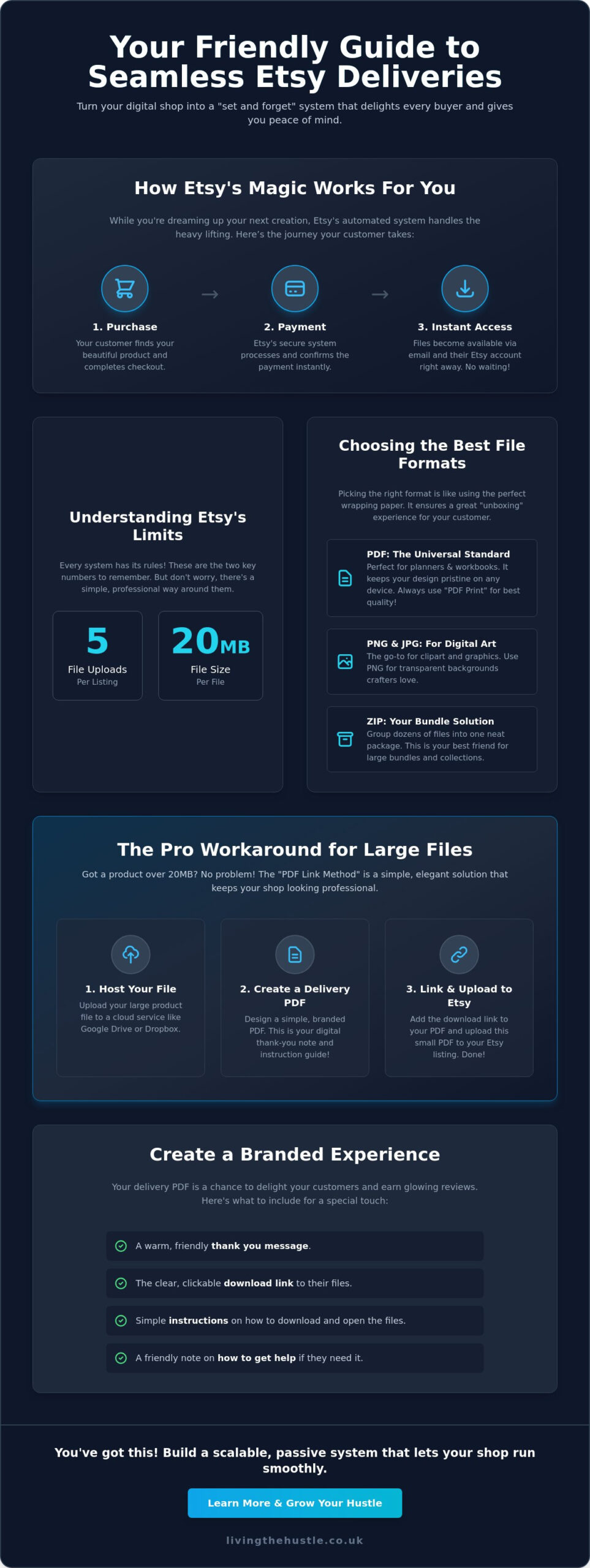
The automated journey is designed for ease. Here is how it works for your buyer:
- The customer finds your beautiful listing and completes the checkout.
- Etsy processes the payment through their secure system.
- Once the payment is confirmed, the files become available immediately.
- The buyer receives an email and a notification on their dashboard.
In 2026, this instant gratification is the gold standard for digital commerce. Buyers expect to start their projects the moment they feel inspired. If you're still learning how to create digital products, remember that the delivery is just as important as the design itself. A smooth download process is the difference between a one-time buyer and a loyal fan.
How Etsy Notifies Your Customers
How do your buyers actually get their hands on your work? It happens in two ways. First, Etsy sends an automated email confirmation that includes a direct link to the download page. Second, the files are always available in the “Purchases and Reviews” section of the customer's account. This means you don't need to spend your evenings manually emailing attachments. It's a hands-off process that protects your time. It also ensures your customers feel supported from the moment they click buy. You can rest easy knowing the system is working for you while you focus on your next creative idea.
The 20MB Limit: What You Need to Know
While the system is robust, it does have specific boundaries. Etsy allows you to upload up to five files per listing, with each file capped at a 20MB limit. For many simple items like single-page planners or basic art prints, this is plenty of space. However, if you're creating complex bundles or high-resolution graphics, you might find this limit a bit tight. Don't let this technical constraint cause you anxiety. It's a common hurdle that every successful seller has faced. Finding the best way to deliver digital products on etsy often involves navigating these small technical quirks with confidence. While it's frustrating to hit a wall when you have a large, beautiful product to share, there's a very calm way to handle it. We'll explore the professional workarounds for larger files later in this guide. You'll learn how to keep your delivery process looking polished and seamless regardless of file size.
Choosing the Best File Formats for Seamless Downloads
Selecting the right file format is like picking the perfect wrapping paper for a physical gift. It sets the tone for the entire experience. When you're searching for the best way to deliver digital products on etsy, you want a format that is both professional and easy to open. Your choice should feel effortless for the buyer, ensuring they can enjoy their purchase the moment it arrives in their inbox. This thoughtful preparation prevents technical confusion and builds immediate trust with your customers.
PDF: The Universal Standard for Digital Products
PDFs are the gold standard for a reason. They keep your fonts, colors, and layouts exactly as you designed them, regardless of whether your customer is using a laptop or a tablet. If you use Canva, always choose the “PDF Print” option for your planners and workbooks. This specific setting ensures the highest resolution for home printing, so your work looks crisp and professional. PDFs are the most customer-friendly format because they offer a consistent, high-quality viewing and printing experience on every possible device.
Protecting your creative assets is also a vital part of being a professional seller. Understanding Digital Rights Management and copyright can help you feel more secure as you share your files with the world. It's about finding that balance between being helpful to your buyers and keeping your own business safe.
For shops focused on digital art or clipart, PNG and JPG remain the standard. PNG is especially valuable because it supports transparent backgrounds, which many crafters need. If you're building a business around these graphics, you might enjoy learning more about clipart shop profits to scale your shop sustainably and with confidence.
When to Use ZIP Folders
ZIP folders are a brilliant workaround for Etsy's five-file limit. They let you group dozens of high-resolution images or documents into one neat package. This is incredibly helpful for bundles or large collections. However, you should be mindful of mobile users. While shopping on a phone is easy, opening a ZIP file on a mobile device can be a little tricky for some buyers. To keep the process calm and helpful, try these steps:
- Include a tiny “Read Me” text file or a PDF with simple unzipping instructions.
- Label your files clearly so customers know exactly what's inside.
- Balance high-quality files with a manageable total folder size.
A little bit of guidance goes a long way in preventing “I can't open this” emails. This proactive approach is truly the best way to deliver digital products on etsy while keeping your support inbox empty and your customers happy. It turns a potential technical hurdle into a smooth, professional experience that encourages 5-star reviews.
How to Deliver Large Files and Bundles on Etsy
What happens when your creative vision is bigger than Etsy's 20MB file limit? You don't need to shrink your designs or compromise on quality. The best way to deliver digital products on etsy when you have large bundles or high-resolution files is the “PDF Link Method.” This simple workaround keeps your delivery process professional. It ensures your customers get everything they paid for with just one click. It is a beautiful way to maintain a passive system while providing immense value to your buyers.
Instead of uploading your heavy files directly to the Etsy dashboard, you'll host them on a secure cloud storage provider like Google Drive or Dropbox. This approach is a standard part of how to sell products online successfully. It allows you to offer massive bundles that would otherwise be impossible to share. By using an external host, you're not just bypassing a limit; you're creating a more organized and scalable digital library for your brand. It feels much more professional than sending multiple small, confusing files.
Step-by-Step: Creating Your Access PDF
Think of this PDF as a digital welcome card. You can design a simple, beautiful one-page document in Canva that matches your shop's branding. This document will be the only file you actually upload to your Etsy listing. Inside, include a clear “Click Here to Download” button that links directly to your storage folder. You can also add a warm “Thank You” note and invite them to explore more within the Passive Income Society. This turns a technical necessity into a lovely marketing opportunity that stays completely automated.
Managing Permissions and Security
When you share a link from your cloud storage, security is paramount. You want your customers to have easy access without the ability to accidentally delete or edit your master files. Always set your link permissions to “Viewer” or “Anyone with the link can view.” This allows them to download the files to their own device while keeping your original copies safe and sound. It's a small step that provides massive peace of mind for you as a creator.
How do you know it's working? Before you hit “publish” on your listing, always test your link in an “Incognito” or “Private” browser window. This simple check confirms that someone who isn't logged into your account can still access the files. Verifying your links ensures a smooth, frustration-free experience for your buyers from day one. This proactive habit is the best way to deliver digital products on etsy without ever worrying about a “broken link” message from a customer.
Elevating the Customer Experience with Branded Delivery
Many sellers believe the transaction ends the moment a customer clicks “buy.” In reality, the delivery phase is your very first “unboxing” experience. It's the moment your customer goes from feeling curious to feeling either delighted or frustrated. The best way to deliver digital products on etsy involves treating your download file like a warm welcome into your creative world. When you provide a delivery that feels intentional and branded, you aren't just sending a file. You're building a relationship that leads to glowing 5-star reviews and repeat business.
Think of your delivery PDF as a digital concierge. Instead of a blank file name, your customer should open a document that reflects your shop's personality. This is your chance to shine. You can use this space to thank them, provide clear instructions, and even gently point them toward other treasures in your shop. It's a simple way to make your business feel like a high-end boutique rather than a generic digital warehouse.
Creating a “Thank You” Experience
Buyer's remorse can happen even with small digital purchases. A warm, encouraging welcome message inside your delivery file immediately settles those nerves. It reminds the customer why they chose your shop in the first place. You don't need to be a professional writer to make an impact. Just be yourself. A short note expressing your genuine gratitude goes a long way. If you want to ensure your products look as professional as your delivery, you might find inspiration in The Art of Design to help your presentation stand out.
Troubleshooting Guides for Customers
Nothing kills the “passive” part of passive income faster than an inbox full of tech support questions. Most customers ask the same few things: “Where is my file?” or “How do I print this correctly?”. You can reduce your support messages by 80% just by being proactive. Include a tiny troubleshooting section in your delivery PDF that addresses these common hurdles. When you answer their questions before they even have to ask, you're providing a level of care that customers truly appreciate. It makes them feel supported and capable.
- Clearly list the steps to find files in their Etsy “Purchases” section.
- Provide a few quick tips for the best printing results.
- Offer a clear, friendly way for them to contact you if they truly get stuck.
By keeping your instructions calm and helpful, you remove the technical anxiety that often comes with digital downloads. This professional touch is truly the best way to deliver digital products on etsy while keeping your own schedule free from constant troubleshooting. If you're ready to turn these small steps into a scalable business, you can join the Passive Income Society Course to master every detail of your digital journey.
Automating Your Etsy Shop for True Passive Income
Moving from a side hustle to a scalable business is a beautiful transition. It's about shifting your mindset from “doing the work” to “managing the system.” The best way to deliver digital products on etsy is to ensure your shop is a well-oiled machine that serves your customers even when you're away from your desk. When your delivery system is truly automated, you gain the freedom to focus on your creativity or simply enjoy your day. This hands-off approach is what makes digital products the ultimate path to a peaceful lifestyle.
To keep this system running smoothly, you need to know what's working behind the scenes. Using eRank for Etsy Sellers allows you to monitor your listings and see where you might need to tweak your delivery files or descriptions. If a specific product gets more questions than others, it might be time to refresh the “Thank You” PDF or update the instructions. Data isn't a source of stress; it's a tool for peace of mind. It helps you make small, impactful changes that keep your shop growing without adding to your daily to-do list.
Scaling Your Shop Calmly
Growth doesn't have to be loud or overwhelming. A simple habit of reviewing your delivery process every six months keeps everything current and efficient. Software tools like Canva evolve, and sometimes links or features change. By setting aside a quiet afternoon twice a year to check your links, you prevent future technical hiccups. For those ready for a deeper, more structured path, the Passive Income Society offers a clear roadmap to scale without the typical entrepreneurial burnout. It's about building a business that respects your boundaries.
Your Next Steps for Growth
Once your delivery is automated and your systems are in place, you can focus on the fun part: sharing your work with the world. Pinterest is a fantastic, low-stress way to drive traffic to your shop without the pressure of daily social media posting. It works in the background, much like your delivery system, to bring new eyes to your automated listings. You've already done the hard work of setting up the best way to deliver digital products on etsy. Now, it's just about letting the world find your beautiful creations.
You have the tools, the knowledge, and a clear path forward. Take that first step today with confidence. Your future self will thank you for the peaceful, sustainable business you're building right now. Success is within your reach, and it doesn't have to cost you your tranquility.
Your Path to a Peaceful and Scalable Shop
You now have a clear, manageable roadmap to handle everything from Etsy's file size limits to creating a beautiful, branded experience for your buyers. Remember that the best way to deliver digital products on etsy is the one that protects your peace while delighting your customers. By choosing the right formats and mastering the PDF Link Method, you've removed the technical barriers that often lead to overwhelm. Your shop is no longer just a side project; it's a professional system designed for sustainable, long-term growth.
If you're looking for step-by-step guidance designed specifically for non-techies, join the Passive Income Society and build your dream Etsy shop today! As our most popular course for Etsy sellers, it focuses entirely on calm growth and helping you create a business that fits your life. You don't have to navigate these technical waters alone. We are here to help you turn your creative spark into a thriving digital library. Believe in your vision and take that first intentional step toward your dream today. Success is waiting for you.
Frequently Asked Questions
What is the maximum file size for digital products on Etsy in 2026?
The maximum size for each individual file is 20MB, and you can upload up to five files per listing. This gives you a total capacity of 100MB per product if you use all five slots. If your creative work exceeds these limits, using a PDF that links to a secure cloud storage folder is the best way to deliver digital products on etsy without compromising on quality.
Can I sell digital products on Etsy without a website or external storage?
Yes, you can run a successful shop using only Etsy's built-in delivery system. If your files are under the 20MB limit, you simply upload them directly to your listing and Etsy handles the hosting for you. This is a wonderful way to start your journey with zero extra overhead costs. You only need to consider external storage once your product bundles become too large for the standard dashboard.
How do I deliver a Canva template to my Etsy customers?
You deliver Canva templates by sharing a “Template Link” inside a branded PDF document. First, generate the specific template link within Canva, then paste it into a beautiful “Thank You” note that you upload to your Etsy listing. When a customer makes a purchase, they download your PDF and click the link to open their own editable copy. It's a professional and seamless way to share your designs.
What happens if a customer says they didn’t receive their download link?
You should first kindly guide the customer to the “Purchases and Reviews” section of their Etsy account. Most missing links are simply stuck in a spam folder or a hidden email tab. If they still have trouble, you can manually send the file through an Etsy message or directly to their email. Staying calm and helpful in these moments turns a small technical glitch into a positive experience that builds trust.
Is it better to use ZIP files or a PDF link for large bundles?
Use ZIP files for small collections of images and a PDF link for very large or high-resolution bundles. While ZIP folders keep things organized, they can sometimes be difficult for customers to open on mobile devices. A PDF link to a service like Google Drive is often the best way to deliver digital products on etsy because it offers a branded experience and handles massive files without any technical friction.
Can I change the delivery file after a customer has already purchased?
You can update the files in your listing at any time, but these changes only apply to future sales. Customers who have already purchased will only see the version of the file that was live when they bought it. If you need to provide an updated version to a past buyer, you'll need to send the new file or link to them manually through an Etsy message. It's a lovely way to show extra care.
How do I protect my digital files from being shared or stolen?
You can protect your designs by flattening your PDFs and including a clear “Terms of Use” page in every download. Flattening ensures that your original graphics cannot be easily extracted or edited by others. While no digital file is completely theft-proof, most buyers are honest individuals who respect your hard work. Focus on creating original, high-quality art and building a community that values your unique creative voice.