
What if you didn't need a single camera lens or a professional studio to create the most clickable shop on Etsy? It's common to feel a bit stuck when you don't identify as a photographer or a “creative” person. You might worry that your digital downloads look flat or unappealing compared to physical goods. It is frustrating when technical specs like pixels and aspect ratios feel like a barrier to your success. This guide offers gentle, effective etsy listing photo tips to help you create high-converting images that stop the scroll and build your passive income with confidence.
You deserve a shop that looks cohesive and professional without the late-night stress. We'll walk through a simple, repeatable process for creating mockups in Canva that make your digital items look tangible and clickable. You will learn the exact requirements for the 2026 marketplace, including why the 4:5 aspect ratio is essential for the 65% of Etsy customers shopping on mobile phones. We'll also cover why aiming for 3000 pixels ensures your work stays sharp and clear. Let's turn those digital files into beautiful visual invitations that your customers will love.
Key Takeaways
- Learn why the 3-second rule determines your shop's success and how to build instant trust with your primary image.
- Follow our 10-slide blueprint to provide total transparency, helping you reduce buyer's remorse and increase sales.
- Discover how to use specific etsy listing photo tips to choose a signature color palette that feels both peaceful and productive.
- Find out why choosing between PNG and JPG file formats is the secret to maintaining clarity in your digital product mockups.
- Explore how to transition from individual sales to a sustainable digital business that supports your well-being.
Why Your Etsy Listing Photos Are Your Most Powerful Sales Tool in 2026
Did you know that most shoppers decide whether to click on your listing in less than three seconds? This “3-second rule” is exactly why your primary photo is your most hardworking employee. In 2026, the marketplace is busier than ever. If your image doesn't immediately communicate what your product is and why it matters, shoppers will simply keep scrolling. Using effective etsy listing photo tips helps you capture that fleeting attention without feeling overwhelmed by the competition.
High-quality images do more than just look pretty; they build a bridge of trust. Because digital downloads can't be touched or held, your photos must provide that tactile feeling through visual cues. When you use clear, professional images, you significantly reduce buyer's remorse and the likelihood of negative reviews. Customers feel confident because they know exactly what they are getting. In 2026, we've seen a massive shift away from plain, boring screenshots. Successful sellers are now using “lifestyle” digital mockups that show a planner being used on a tablet or a piece of wall art hanging in a cozy, sunlit room. This visual clarity is the ultimate antidote to customer confusion.
Understanding the ‘Stop the Scroll' Psychology
How do people actually shop on Etsy? Mobile devices now account for over 65% of traffic. This means your images are often viewed on tiny screens while the user is on the go. To stand out, you need high contrast and a thoughtful color palette that pops against Etsy's white background. While you don't need a DSLR, your images still need to meet a high technical standard to look sharp on every device. Visual trust is the bridge between a curious click and a confident purchase. By implementing smart etsy listing photo tips, you can ensure your shop feels like a welcoming, professional space.
Digital vs. Physical: The Core Difference in Strategy
One of the best things about selling digital products is that you don't need an expensive camera or a lighting kit. You're creating a professional digital presentation rather than a physical photoshoot. This takes the pressure off those who feel they aren't “real” photographers. Your focus should be on “perceived value.” This means using mockups that make your digital file look like a premium, essential tool. If you're just starting out, this beginner's guide simplifies the entire process. You can create stunning visuals using simple tools like Canva, allowing you to grow your shop at a pace that feels sustainable and calm.
Technical Requirements and the Magic of Digital Mockups
Setting up your shop shouldn't feel like a technical exam. While many guides for physical sellers focus on lighting and tripods, digital creators play by a different set of rules. You aren't just taking a picture; you're building a visual experience. Following these etsy listing photo tips ensures your files look as sharp on a customer's phone as they do on your design screen. By mastering a few simple specs, you can move past the technical confusion and get back to the creative work you love.
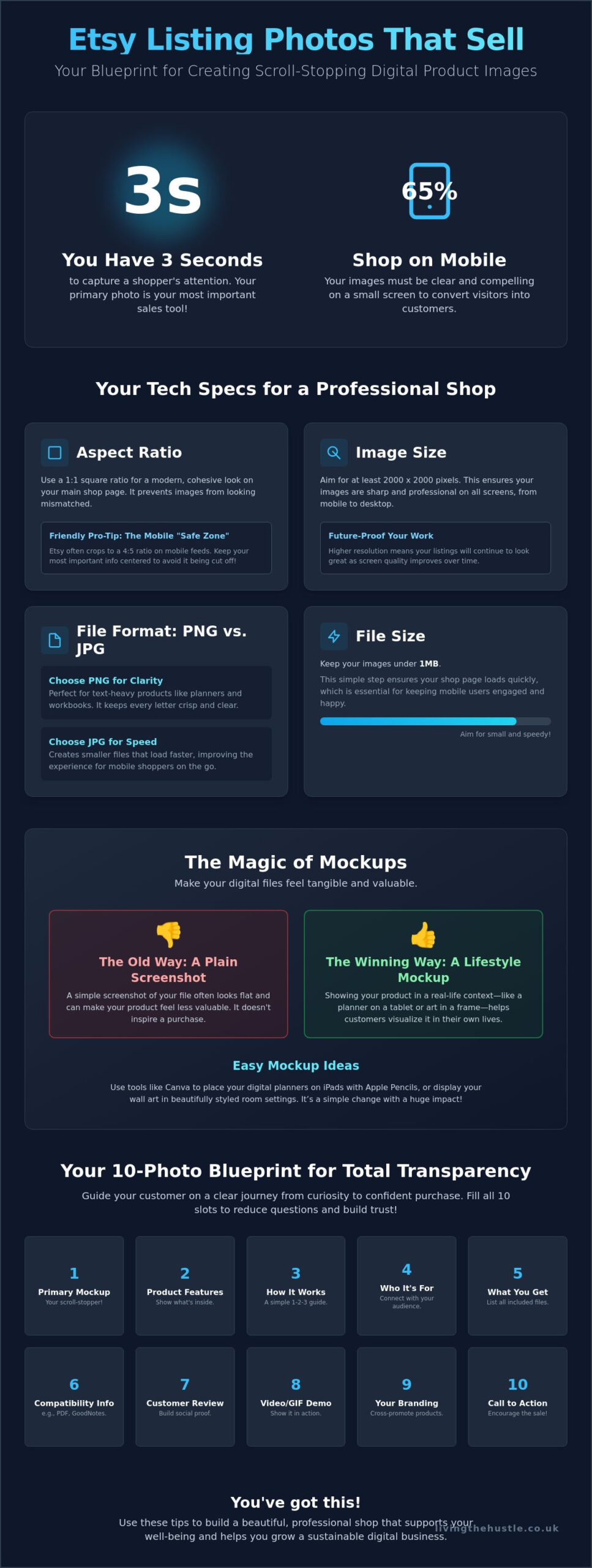
The 2026 standard for a professional shop is a 2000px by 2000px image. This creates a perfect 1:1 square aspect ratio that looks balanced and clean in Etsy's search results. While Etsy accepts several formats, choosing between PNG and JPG is your first big decision. PNG files often provide better clarity for text-heavy digital products like planners or workbooks. However, they can be large. JPG files are typically smaller and help your page load faster. Since over 65% of Etsy traffic comes from mobile devices, speed is vital. Aim to keep your file sizes under 1MB so your shop remains snappy and responsive for shoppers on the go.
Etsy Photo Specs You Can't Ignore
Is square always better? While some sellers still use a 4:3 ratio, the 1:1 square has become the modern winner for cohesive shop grids. It prevents your images from looking mismatched when a buyer visits your storefront. Just remember the “safe zone.” Keep your most important text and product details in the center of the image. This prevents Etsy's search algorithm from cropping out your best selling points in the thumbnail view. If you want to refine your visual style even further, you might enjoy exploring the art of design to help your products truly shine.
Choosing the Right Mockups for Your Niche
The secret to high conversion rates is making a PDF feel like a physical tool. A plain screenshot of a page rarely inspires a purchase. Instead, use digital mockups to breathe life into your work. For digital planners, choose mockups that feature iPads, Apple Pencils, or cozy coffee-shop backgrounds. If you sell wall art, place your designs in frame styles that match your target audience's home decor. You don't need to spend a fortune on these; sites like Canva offer high-quality, calm-styled mockups that look professional rather than generic. This simple shift helps customers visualize exactly how your product fits into their daily lives.
Styling Your Digital Brand with a Calm Aesthetic
Do you ever visit an Etsy shop and immediately feel a sense of peace? That isn't an accident. It's the result of intentional, cohesive branding. When your listing photos look like they belong together, you tell the customer that you're a professional they can trust. Consistency is your best friend in a crowded marketplace. It transforms a collection of random files into a recognizable brand that people remember and return to. By using these etsy listing photo tips, you can create a shop aesthetic that feels both organized and inviting.
Start by choosing a signature color palette. For a calm brand, think of soft neutrals, gentle sage greens, or dusty blues. These colors evoke feelings of tranquility and productivity, which are perfect for digital planners or educational tools. Once you have your colors, create a “Master Listing Template” in Canva. This is a single document where you keep your preferred layout, fonts, and background styles. Instead of starting from scratch for every new product, you simply swap out the mockup. This saves you hours of design time and ensures every photo follows the same visual language.
Building a Cohesive Shop Look
How do you decide on your visual identity? If you're feeling a bit lost, this Etsy Shop Branding 101 guide is a wonderful place to start. It helps you define your brand voice before you even open Canva. Once you have a direction, stick to the same fonts and filters for every image. A simple “Brand Board” acts as your North Star. It's just a small reference sheet with your hex codes and font names. This tiny step prevents your shop from looking cluttered and keeps your customer's focus exactly where it should be: on your amazing products.
Canva Tips for Non-Designers
You don't need to be a graphic designer to have beautiful images. Canva is one of the best Etsy seller tools for 2026 because it does the heavy lifting for you. Use the “Smart Mockup” feature to place your digital designs into realistic frames or device screens instantly. Want to make your digital pages look “real”? Use the shadow effect trick. Adding a soft, subtle shadow behind your PDF pages gives them depth and makes them feel like something the customer could actually pick up. It's these small, thoughtful details that make your etsy listing photo tips truly effective. Keep your designs clean and avoid the temptation to add too many decorative elements. A focused image is always more clickable than a cluttered one.
Beyond the First Photo: Using All 10 Slots to Convert
Why stop at just one photo? While your primary image catches the eye, the remaining nine slots are your chance to close the sale. Think of these extra photos as a gentle conversation with your customer. You're answering their questions before they even have to ask. By following a structured 10-slide blueprint, you can use these etsy listing photo tips to guide your visitors from curiosity to a confident purchase. It's about creating a peaceful shopping experience where the buyer feels fully informed and supported.
Slides 2 and 3 should focus on transparency. This is where you break down exactly what the customer is buying. Use these slots to show the “What's Included” details. Since digital products can't be held, you need to make them feel substantial. You might show a grid of all the pages in a planner or a list of the different file formats provided. This clarity builds immediate trust and sets the stage for a positive transaction.
By slides 4 and 5, it's time to shift from features to benefits. Instead of just saying your product is a “daily planner,” show how it solves a problem. Use mockups that depict a cluttered schedule becoming organized and calm. Show the “after” effect of using your digital tool. People don't just buy files; they buy the result that the file provides. This emotional connection is what turns a browser into a buyer.
Your final slide is the perfect place for an invitation. Use slide 10 to provide a clear call to action and a touch of social proof. You could include a small quote from a happy customer or a reminder to “Favorite the shop” for updates. If you're ready to take your shop to the next level, you might want to join the Template Creators Society to learn how to scale your digital business with ease.
The Essential ‘What's Inside' Slide
How do you visualize something that only exists on a screen? Use simple icons for PDF, PNG, or Canva links to show the file types included. If you're selling a bundle, show the number of pages or variations clearly. Visual transparency reduces customer support queries. When customers can see exactly what they'll receive, they don't need to message you with basic questions. This saves you time and creates a smoother journey for your buyers.
Using Text Overlays Effectively
Text overlays are a powerful way to highlight key selling points, but they must be “short and sweet.” Avoid long paragraphs that clutter the image. Focus on accessibility by ensuring your text is large and has high contrast. This makes it readable on small phone screens where most Etsy shopping happens. Always highlight “Instant Download” in your text. This manages delivery expectations immediately, letting the customer know they'll get their product the moment they checkout. These etsy listing photo tips help you create a professional, accessible shop that respects your customer's time.
Scaling Your Shop with the Passive Income Society
Building a shop that brings in sales while you sleep is a beautiful goal. While you've now mastered several etsy listing photo tips to help your products shine, remember that images are just one piece of the puzzle. A truly successful digital business requires a blend of great design, smart search optimization, and a sustainable mindset. You don't want a shop that feels like a second full-time job; you want a manageable side project that supports your well-being. By focusing on quality over quantity, you can create a presence that grows steadily without the burnout.
Moving from the occasional “one-off” sale to a consistent, calm digital business is about creating a repeatable system. In 2026, active sellers who maintain between 50 and 100 optimized listings in a focused niche often see monthly earnings between $1,000 and $5,000. This level of success doesn't happen by accident. It comes from having a clear roadmap. The Passive Income Society provides exactly that, guiding you through every step of the journey from your first listing to your first hundred sales.
Mastering the Art of Digital Sales
You don't have to navigate this path alone. Joining a community of like-minded creators who value peace over the typical “hustle” can make all the difference. When you're part of a supportive group, you can get expert feedback on your shop's visual identity and refine your approach. If you feel ready to expand your reach, learning to scale without the overwhelm is the next logical step. It's about building a business that serves your life, rather than a life that serves your business.
Your Calm Creation Checklist
Ready to start? Use this simple checklist to audit your current listings and move forward with confidence:
- Step 1: Choose a mockup style that reflects your brand's calm aesthetic.
- Step 2: Create a repeatable Canva template to save time and maintain consistency.
- Step 3: List your products using the 10-slide blueprint to build trust and clarity.
Remember that progress is always better than perfection. Your shop will evolve as you learn more about your customers and their needs. Take a deep breath and trust the process. Applying these etsy listing photo tips is just the beginning of your growth. If you're looking for a mentor to walk beside you, join the Passive Income Society today to build your dream shop. You have everything you need to create a peaceful, profitable presence on Etsy.
Ready to Build Your Calm and Profitable Etsy Shop?
Creating a shop that feels both professional and peaceful is entirely within your reach. You've learned how to meet technical specs with sharp 2000px images and why the 1:1 aspect ratio is essential for mobile shoppers. By using digital mockups and maximizing all ten listing slots, you've built a foundation of visual trust with your customers. These etsy listing photo tips are the first step toward a more manageable and rewarding selling experience.
Great photos are a wonderful start, but you don't have to navigate the rest of your business journey alone. If you're looking for a sustainable way to grow, you can start your calm journey with the Passive Income Society. This course offers step-by-step guidance for beginners and connects you with a supportive community of over 1,000 creators. You deserve a business that brings you joy without the overwhelm. Take that first gentle step today and watch your digital shop bloom.
Frequently Asked Questions
What is the best size for Etsy listing photos in 2026?
The best size for your photos is at least 2000 pixels on the shortest side; however, 3000 x 3000 pixels is recommended for the sharpest zoom quality. Etsy currently uses a 4:5 aspect ratio for search result thumbnails and listing pages. Sticking to these dimensions ensures your work looks professional on every device. It's a simple way to maintain high quality and build visual trust without technical stress.
Do I need a professional camera for Etsy digital products?
You don't need a professional camera to create beautiful digital product images. Most successful digital sellers use high-quality mockups and design software like Canva instead of traditional photography. This approach allows you to showcase your items in a realistic, professional way without the expense of studio equipment. It's an empowering way to start your shop while keeping your initial costs low and your process simple.
How can I make my digital products look real in photos?
You can make your digital products look real by using mockups that place your designs into realistic settings like tablet screens or picture frames. Adding subtle shadow effects in your design software creates depth and makes flat files feel like tangible tools. This visual strategy helps customers imagine using your product in their own lives. It turns a simple download into an essential resource they can't wait to use.
Can I use Canva for my Etsy listing photos?
Yes, Canva is a wonderful tool for creating your listing images. It offers specific features like “Smart Mockups” and easy-to-use templates that simplify the entire design process for non-designers. Applying etsy listing photo tips within Canva helps you maintain a cohesive brand look while keeping your workflow calm and efficient. It's a favorite for creators who value their peace of mind and want a repeatable system.
Why are my Etsy photos looking blurry after I upload them?
Your photos might look blurry if the file resolution is too low or if you're using a file type with high compression. Ensure your images are at least 2000 pixels wide and save them as high-quality PNG or JPG files to maintain clarity. Using the recommended 3000 x 3000 pixel size prevents loss of sharpness when customers zoom in. This small technical adjustment makes a massive difference in your shop's professional appearance.
How many photos should I actually use for a digital product?
It's best to use all 10 available photo slots to provide the most value to your potential customers. While the first photo is meant to stop the scroll, the remaining slots are perfect for showing exactly what's included and the specific benefits of your product. Using more etsy listing photo tips across these slides helps answer buyer questions and builds lasting trust. It's an invitation for them to explore your work fully.
Should I use a white background for all my Etsy photos?
No, you don't need to use a white background for every photo, as modern trends favor “lifestyle” mockups that show products in use. A mix of clean backgrounds and stylized settings often works best to build interest and show off your brand's personality. Choose a style that matches your signature color palette to keep your shop looking cohesive. This approach helps your listings stand out in a sea of generic images.
How do I add a video to my Etsy listing for a digital item?
You can add a video by uploading a 5 to 15 second clip that is under 100MB in size. Note that Etsy videos do not include audio, so focus on showing the product in use or scrolling through the pages of your digital file. This is a great way to show the functionality of digital planners or editable templates. It gives customers a quick, engaging look at what they are about to buy.