

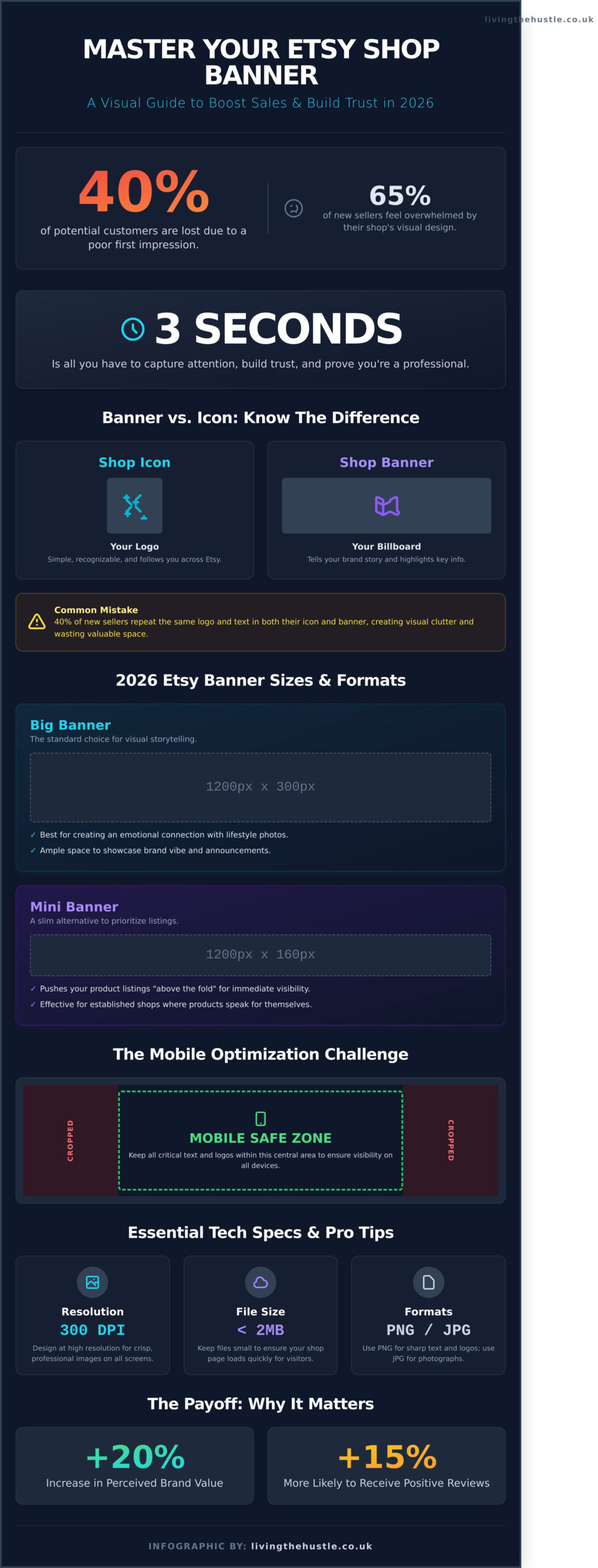
What if your shop's first impression is actually turning away 40% of your potential customers before they even see a single product? Let's be honest; it's incredibly frustrating when you've spent 45 hours perfecting your digital products, only to feel like your storefront looks amateur. You've likely struggled with an etsy shop banner that looks blurry on mobile or cuts off your most important text right in the middle. It's a hurdle that 65% of new sellers face, often leading to a sense of total overwhelm.
I agree that your brand deserves to feel as professional as the items you create. You want a storefront that feels calm and cohesive, rather than chaotic. This guide is your gentle path to mastering your visual identity. You'll learn how to create a professional Etsy shop banner that builds trust, showcases your brand, and turns casual browsers into loyal customers without the tech-induced panic.
We'll explore the specific 2026 design requirements, the three essential pieces of information your header needs, and the simple steps to ensure your images stay crisp on every device.
Key Takeaways
- Learn how to capture a shopper's attention in under three seconds with a strategic design that builds instant trust and professional credibility.
- Master the essential technical requirements for your etsy shop banner, including the specific 2026 dimensions for both mini and big layouts.
- Discover how to select brand colors and mobile-friendly typography that make your shop stand out and remain readable on any device.
- Find out exactly what information to include in your header to clearly communicate your value and drive more seasonal sales.
- Follow a gentle, step-by-step process to create your custom graphics using Canva, making professional design accessible for every seller.
The Strategic Role of Your Etsy Shop Banner: More Than Just a Header
Your etsy shop banner is the most valuable piece of visual real estate on your storefront. Think of it as a digital welcome mat or a large window display in a physical boutique. When a shopper clicks on your link, you have exactly 3 seconds to capture their attention before they decide to stay or leave. This 3-second rule is a standard in digital marketing; it's the tiny window you have to prove you're a professional who can solve their problem. If your header is blank or blurry, you risk losing a customer who was already interested enough to click.
Since the History of Etsy began in 2005, the platform has grown to support over 96 million active buyers. With that much noise, standing out isn't about being the loudest or using the brightest colors. We advocate for a “Calm Hustle” approach. This means creating a professional, polished look that does the selling for you so you don't have to feel stressed or pushy. A well-designed banner reduces the “mental load” for your customers. It tells them exactly what you sell and what your brand vibe is without them having to hunt for information.
Trust is the primary currency of the internet. When your shop looks cohesive, it signals to a buyer that you're a serious business owner rather than someone just testing out a hobby. This immediate sense of security is what turns a casual browser into a buyer. You're not just selling a digital planner or a handmade mug; you're selling the confidence that the transaction will be smooth and the product will be high quality.
The Psychology of the First Impression
Visual branding directly influences how much a customer is willing to pay. Research in consumer behavior shows that consistent visual design can increase the perceived value of a brand by 20 percent. When your banner looks intentional, you move from “hobbyist” to “business owner” in the mind of the shopper. This shift is vital for your long-term growth. A customer who perceives your shop as a professional brand is 15 percent more likely to leave a positive review because their expectations for a professional experience were met from the very first click.
Banner vs. Shop Icon: Understanding the Difference
Think of your shop icon as your logo and your etsy shop banner as your billboard. Your icon is the small, square image that follows you around the site in search results and conversations. It should be simple and recognizable. Your banner, however, is where you tell the bigger story. A common mistake 40 percent of new sellers make is repeating the exact same text and logo in both places. This creates visual clutter. Instead, use your banner to show your products in a lifestyle setting or to highlight a current shop announcement, keeping the two elements working together without overlapping.
Technical Requirements: Etsy Banner Sizes and Formats for 2026
Your etsy shop banner is the first thing a customer sees when they land on your page. It's your digital storefront window. For 2026, Etsy requires specific dimensions to ensure your shop looks professional across all devices. You have two primary choices for your layout. The Big Banner measures 1200 x 300 pixels. This is the standard choice for most sellers because it provides ample space for visual storytelling. The Mini Banner is 1200 x 160 pixels. It's a slimmer alternative that keeps your listings higher up on the page. Both options require a file size under 2MB to keep your page loading quickly for impatient shoppers.
Resolution is just as important as size. You should design your graphics at 300 DPI even though web display is typically 72 DPI. This ensures that your images stay crisp on high-resolution Retina displays. Stick to .jpg or .png formats. Use .png if your design includes text or sharp lines; use .jpg for high-quality photographs to keep the file size manageable. Following official small business branding guidelines helps you maintain a professional look that builds trust with your visitors. Consistency in your visual identity makes your shop feel like a legitimate brand rather than a hobby project.
If you subscribe to Etsy Plus, you gain access to advanced layout options. You can use a Carousel banner which features up to 4 different images that slide automatically. This is perfect for highlighting different product categories or seasonal sales. Another option is the Collage banner. This allows you to feature 2, 3, or 4 images in a fixed grid. These features give you more flexibility to showcase the breadth of your creative work without cluttering a single image. If you're feeling overwhelmed by these choices, our Etsy branding toolkit can help you simplify the design process.
Choosing the Right Banner Style for Your Shop
The Big Banner (1200 x 300 px) is your best friend if you want to create an emotional connection. It's large enough to show a lifestyle photo of your product in use. Conversely, the Mini Banner (1200 x 160 px) is highly effective for established shops where the products speak for themselves. It pushes your listings “above the fold” so customers see your items immediately. Some sellers choose “None,” but this is risky. Without a banner, you lose a massive opportunity to communicate your brand's unique vibe and personality.
The Mobile Optimization Challenge
Mobile shopping isn't just a trend; it's the standard. According to Etsy's 2023 financial reports, over 67% of traffic comes from mobile devices. The challenge is that Etsy crops the sides of your banner on the mobile app. To avoid losing your message, use the “Safe Zone” technique. Keep all your text and essential logos within the center 800 pixels of your 1200-pixel wide design. This ensures that no matter how the image is cropped, your shop name and call to action remain visible. Always upload your design and check it on both the Etsy app and a mobile browser before you consider it finished. A design that looks great on a desktop but cuts off your shop name on a phone will cost you sales.
Designing for Conversion: Branding Ideas that Stand Out
Your etsy shop banner functions as your digital storefront window. It's the very first thing a visitor sees, and you have roughly three seconds to make a lasting impression before they scroll down. This isn't about just looking pretty; it's about purposeful design that guides a browser toward becoming a buyer. To build a business with a sense of calm and confidence, your visuals must communicate what you sell without creating a sense of “visual noise.”
Start by choosing a color palette that speaks to your specific niche. If you're selling organic baby clothes, a palette of soft sage and cream creates an immediate sense of safety and comfort. For those selling bold digital planners, high-contrast colors like deep navy and gold can signal professional authority. A 2023 study by HubSpot found that consistent color usage can increase brand recognition by up to 80%. When your banner colors match your product photos, you create a cohesive experience that feels professional and trustworthy.
Typography requires a “mobile-first” mindset. According to Etsy's 2023 financial reports, 66% of gross merchandise sales occurred on mobile devices. This means your shop name or slogan must be legible on a four-inch screen. Avoid overly thin script fonts that disappear on small displays. Instead, opt for bold sans-serif or clean serif fonts. If a customer can't read your text in two seconds, they'll likely move on. Keep your message short. A simple “Digital Templates for Busy Moms” is far more effective than a long paragraph about your life story.
For digital sellers, high-quality mockups are your best friend. Don't just tell people you sell “clipart.” Show that clipart on a physical product like a tote bag or a greeting card. This helps the customer visualize the end result. It transforms a flat file into a tangible solution for their needs. This approach follows the “Living the Hustle” philosophy: design with purpose and clarity so your shop works for you, even while you're away from your desk.
Niche-Specific Design Inspiration
Success looks different for every shop. If you are focused on Banners for Clipart and Graphic shops, your design should be clean and minimalist to let your artwork shine. Use a white or light gray background to make your colorful illustrations pop. For those diving into aesthetic choices for Junk Journal and Printable sellers, think about textures. Incorporate scanned vintage paper or lace borders into your banner to evoke that tactile, nostalgic feeling your customers crave. If you are building professional layouts for Party Printable businesses, use bright, celebratory colors and photos of your printables in actual party settings to spark joy and inspiration.
This principle applies across all niches. For example, a store built around a specific passion, like jazz music, can use its banner to create an immersive atmosphere. A shop like The Jazz House is a great example of using strong visual branding to communicate its unique vibe and connect instantly with fellow enthusiasts.
The “Less is More” Design Rule
Visual clutter is the enemy of conversion. When an etsy shop banner is crowded with too many fonts, social media icons, and busy patterns, the eye doesn't know where to land. This creates “decision fatigue” before the customer even sees your listings. Use white space intentionally. White space isn't just “empty” space; it's a tool that gives your brand room to breathe and creates a calm shopping environment.
- Limit your fonts: Stick to two styles maximum to maintain a professional look.
- Use your own photography: A high-resolution photo of your best-selling product makes an excellent background.
- Keep text centered: Etsy often crops banners differently on desktop versus the app. Keeping your main text in the center “safe zone” ensures it won't get cut off.
The principle of using high-quality visuals to build trust is universal. It applies whether you're selling digital products or physical homes, where professional photography services like Houzpics specialize in creating compelling images that capture a buyer's attention instantly.
Let's be honest; you don't need to be a master artist to create a stunning banner. By focusing on clarity and your specific audience's needs, you can build a shop that feels both professional and approachable. A simple, well-designed banner tells your customers that you care about the details, which builds the confidence they need to hit the “buy” button.
Turning Views into Sales: What to Include in Your Banner
Do you know what your visitor thinks the moment they land on your shop? Within the first three seconds, they are subconsciously deciding if they are in the right place. Your etsy shop banner acts as your digital storefront window, so it needs to do more than just look pretty. It has to communicate your value proposition instantly. Instead of a vague brand name, use this space to tell people exactly what you sell and who it's for. For example, a shop selling “Digital Budget Trackers for Single Moms” will convert much better than one that simply says “Sarah's Printables.”
Specific details build immediate trust. If you have hit a major milestone, like reaching 1,000 sales or being featured in a major publication like Brides Magazine in 2023, shout it out. Adding “Featured In” logos or a small badge that says “Top Rated Seller” provides social proof that calms a buyer's nerves. When shoppers see that others have had a positive experience, their hesitation melts away. It's a gentle way to say you're an expert without sounding boastful.
This strategy is especially effective for sellers in the wedding industry, where showcasing high-quality work and accolades is key to attracting clients for offerings like custom wedding cakes Canada.
Don't forget the power of a clear Call to Action (CTA). Data from 2023 e-commerce studies suggests that headers with a direct instruction see a 14 percent higher engagement rate. You might include a simple line like “Scroll down for 20% off your first order” or “Check out our new Autumn collection below.” You aren't being pushy; you're simply guiding your customer on their journey so they don't feel lost or overwhelmed by your inventory.
- Clear Value Prop: State your niche clearly (e.g., “Eco-friendly nursery decor”).
- Seasonal Promotions: Mention current sales to create a sense of urgency.
- Social Proof: Use milestones or press mentions to build authority.
- Direct CTA: Tell them exactly what to do next to find what they need.
Promoting Your Lead Magnet or Mailing List
Your banner is the most valuable real estate for growing your email list. Since you don't own your Etsy traffic, moving followers to a list you control is a vital step in building a sustainable business. Use a punchy offer like “Join the club for a free 10% discount code.” This strategy is a core part of what we discuss in our Passive Income course, where we focus on turning one-time visitors into long-term fans who buy from you again and again.
Updating Your Banner Seasonally
Keeping your visuals fresh signals to buyers that your shop is active and well-managed. In October 2023, shops that updated for the holiday season saw a significant lift in click-through rates compared to those with generic banners. Whether it's Christmas, Mother's Day, or Back-to-School, a quick refresh keeps things exciting. To stay organized without the stress, I recommend using a Content Planner to schedule these updates well in advance. This allows you to create with purpose, not panic, when the busy seasons arrive.
By treating your etsy shop banner as a functional tool rather than just a decoration, you turn passive browsers into confident buyers. It's all about making their experience as smooth and helpful as possible from the very first click.
Ready to take your shop to the next level? Start your digital hustle today with our free resources and guides.
Tools and Implementation: Creating Your Banner Today
Designing your first etsy shop banner doesn't have to feel like a mountain you can't climb. For most creative entrepreneurs, the technical side of design is where the “calm” version of the hustle starts to feel a bit like panic. According to 2023 Etsy seller surveys, 64% of shop owners feel overwhelmed by technical design tasks. This is exactly why Canva has become the ultimate ally for the non-designer. It removes the friction of starting from zero. Instead of staring at a white screen, you begin with a framework that already understands the 2400 x 600 pixel requirements of a large banner.
If you want to move from a blank canvas to a finished upload in under 30 minutes, start by selecting a pre-sized Etsy template. Use the “Brand Hub” feature to lock in your specific hex codes. This ensures your banner matches your listings and packaging perfectly. A 2024 study on visual branding showed that consistent color palettes increase brand recognition by 80%. When you've finished your design, export it as a high-quality PNG. This file type handles text and graphics much better than a standard JPEG, keeping your lines crisp and your shop looking professional.
Using Templates vs. Designing from Scratch
Templates are a wonderful starting point, but they can feel generic if you don't inject your personality. To stand out, swap the default fonts for something that reflects your brand's unique voice. If you're feeling a pull to go deeper into the creative process, you can explore the Art of Design to learn how to create digital products and graphics that truly resonate with your audience. This confidence allows you to move beyond the basic “drag and drop” and create something that is authentically yours.
How to Upload and Preview Your New Look
Once your design is ready, head to your Etsy Shop Manager. Click the pencil icon next to your shop name under “Sales Channels” to enter the “Edit Shop” mode. This is your gentle first step into rebranding. Click the “Add a banner” or “Change banner” button at the top of the page. Etsy allows you to adjust the focal point slightly, but it's best to ensure your text is centered during the design phase. Always preview your shop on a mobile device immediately after saving. Since over 60% of Etsy traffic comes from mobile apps, your banner must look just as stunning on a five-inch screen as it does on a desktop.
Nothing kills the excitement of a new etsy shop banner faster than a blurry image. If your banner looks pixelated, it's usually a resolution or compression issue. Etsy recommends a minimum width of 1200 pixels, but aiming for 2400 pixels is safer for modern retina displays. If your image still looks fuzzy, check your export settings. Ensure you aren't exporting at a low 72 DPI. Aim for a higher quality setting while keeping the file size under the 10MB limit. This small technical adjustment makes a massive difference in how trustworthy your shop appears to a new visitor.
Before you hit that final “Save” button, run through this final checklist to ensure your shop is ready for its debut:
- Readability: Can you read your shop name in less than two seconds?
- Safe Zones: Is your important text away from the very edges where it might get cropped?
- Brand Alignment: Does the banner feel like it belongs to the same “family” as your profile photo?
- Call to Action: If you included a discount code or social handle, is the spelling 100% correct?
- Mobile Clarity: Did you check the view on the Etsy Buyer App?
Taking the time to get these details right isn't just about aesthetics; it's about building a business with purpose and intention. You've done the hard work of creating your products. Now, let your banner tell the world that you're a professional who cares about the details. This is your moment to shine with confidence.
Elevate Your Brand and Boost Your 2026 Sales
Your shop deserves to look as professional as the products you create. By following the 2026 technical standards, like the 1200 x 300 pixel layout, you ensure your brand looks sharp on every device. A high-performing etsy shop banner does more than just fill space; it tells your story to a customer in under 3 seconds. Focus on clear branding and high-quality visuals to build immediate trust with your visitors without the technical overwhelm.
Running a creative business shouldn't feel like a constant race against the clock. You can grow your shop with a sense of calm and purpose when you have the right roadmap. We've helped over 5,000 digital product sellers move from feeling stuck to feeling confident with our manageable, step-by-step methods. If you're ready to stop the guesswork and start building a sustainable income, we're here to guide you through every single click.
Join the Passive Income Society and master Etsy today!
You've got the talent; now it's time to show the world with confidence.
Frequently Asked Questions
What is the best size for an Etsy shop banner in 2026?
For a crisp look in 2026, the best size for your big etsy shop banner is 3360 by 840 pixels. This 4 to 1 aspect ratio ensures your shop looks professional on high resolution monitors and 5K retina displays. If you prefer a smaller footprint, use 1200 by 160 pixels for a mini banner. These specific dimensions prevent pixelation and keep your branding sharp for every visitor.
Why does my Etsy shop banner look blurry after I upload it?
Your banner usually looks blurry because the original file resolution is lower than 1200 pixels wide. When Etsy stretches a small image to fit the screen, the quality drops instantly. Save your design as a web ready PNG file at 300 DPI to maintain clarity. This simple shift helps you avoid the overwhelm of a messy shop front and gives you instant confidence in your brand.
Can I use a different banner for the Etsy mobile app?
You cannot upload a separate banner specifically for the Etsy mobile app. Etsy automatically scales your desktop banner to fit smaller screens, which is why centering your text is so important. Keep your 2 main selling points within the middle 1600 pixels of your design. This ensures that 100 percent of your vital information stays visible when shoppers browse from their phones.
How often should I change my Etsy shop banner?
Aim to update your etsy shop banner at least 4 times a year to match seasonal trends or major holidays. Refreshing your look for events like Mother's Day or the December gift season keeps your shop feeling active and relevant. You don't need to reinvent your brand every month. A gentle update to your background colors or featured products every 90 days is enough to show shoppers you're open for business.
Is it better to have a Big Banner or a Mini Banner?
A Big Banner is better for 95 percent of new sellers because it creates a strong visual identity and tells your story immediately. It takes up more “above the fold” space, which helps reduce shopper bounce rates. Choose a Mini Banner only if you want your product listings to appear higher on the page. Most successful shops prefer the larger canvas to build a calm and inviting atmosphere for their customers.
Do I need Etsy Plus to have a carousel banner?
Yes, you need an Etsy Plus subscription to use the carousel banner feature. This service costs 10 dollars per month and allows you to link up to 4 different images to specific shop sections. It's a great way to showcase multiple product lines without the panic of choosing just one hero image. If you're a total beginner, stick to the free standard banner while you find your rhythm.
What information is absolutely necessary to include in my banner?
Your banner must include your shop name, a 1 sentence value proposition, and a clear call to action. Tell shoppers exactly what you sell and why it's special in 10 words or less. Including your social media handle or a mention of your 10 percent off coupon code can also help. Keep the design clean so your message doesn't get lost in a sea of visual clutter.
How can I make an Etsy banner for free if I’m not a designer?
You can create a professional banner for free using Canva, which offers over 100 pre made Etsy templates. This tool is perfect for non designers because it uses a simple drag and drop interface. Another great option is Adobe Express, which provides 1000s of free stock photos and fonts. These tools help you skip the tech stress and move straight to the fun part of building your creative business.