

What if you could build a thriving side business without ever having to master complicated software or take a single design class? It's a common myth that you need to be a professional artist to succeed on Etsy. In reality, many of the most successful sellers started exactly where you are today. If you want to create digital product canva designs that people truly love, you don't need to start from a blank white page or feel buried by technical anxiety. You just need a gentle guide to help you turn your existing ideas into something tangible and helpful for others.
I know the confusion over commercial licensing and file types can feel like a heavy weight. You might worry about whether you're allowed to sell what you make or if your sizing is correct for a customer's printer. This guide promises to clear away that fog and show you a manageable path toward passive income. We will explore how to use Canva's 610,000 templates responsibly and how to navigate Etsy's $0.20 listing fees with confidence. By the end of this article, you'll have a clear, step by step plan to launch your first product without the stress, allowing you to grow a business that brings you both profit and peace of mind.
Key Takeaways
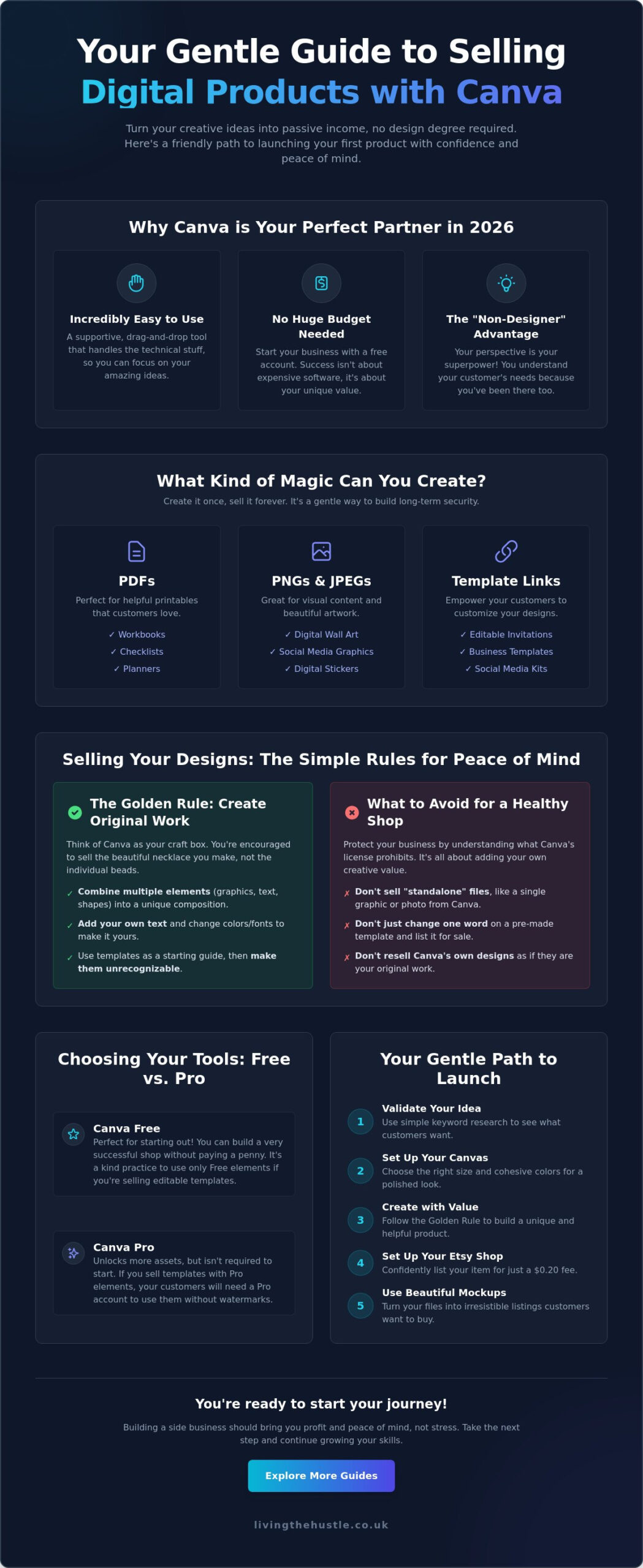
- Discover why Canva is the ideal, low-stress tool for non-designers to build a professional design ecosystem in 2026.
- Learn how to navigate licensing rules by adding creative value to your designs so you can sell with confidence and peace of mind.
- Find out how to create digital product canva designs that customers actually want by using simple keyword research to validate your ideas.
- Follow a gentle step-by-step process to set up your canvas and choose cohesive colors that make your products look polished.
- Understand the simple secrets to setting up your Etsy shop and using mockups to turn your digital files into irresistible listings.
Why Canva is the Perfect Tool for Creating Digital Products in 2026
Establishing an online presence used to feel like climbing a mountain without any gear. You needed expensive software, a four year degree, and an endless amount of patience for technical glitches. By 2026, the landscape has completely shifted toward a more peaceful, drag and drop style of entrepreneurship. Canva has led this change by building a design ecosystem that feels more like a supportive mentor than a cold piece of software. It handles the technical heavy lifting, like file compression and alignment, so you can focus on your ideas. When you choose to create digital product canva designs, you are stepping into a world where your creativity isn't limited by your technical skills. It's about solving problems for your customers with ease and tranquility.
The beauty of this modern approach is the incredibly low barrier to entry. You don't need a massive budget or a background in graphic arts to begin. Because Canva provides a structured environment with built in guides and smart tools, you can move from a simple thought to a finished product in a single afternoon. This allows for a sense of peaceful productivity. You aren't fighting with the tool; you are collaborating with it. It is a sustainable way to build a side project that fits into your life rather than taking it over. If you want to refine your skills further, you can explore the art of design to help your creations truly shine in a busy marketplace.
The “Non-Designer” Advantage
Do you ever feel like you aren't creative enough to sell your work? Your perspective as a beginner is actually a massive advantage. You understand the frustrations and needs of your customers because you've walked in their shoes. Canva’s intuitive interface helps reduce decision fatigue by offering curated options that look professional right away. Remember that done is always better than perfect. Building momentum with simple, helpful designs is the fastest way to grow your confidence and your shop.
What Makes a Product “Digital”?
In the simplest terms, digital products are items that exist in an electronic format. They are the ultimate low risk side hustle because they don't require physical inventory or shipping costs. Common formats you can easily produce include:
- PDFs: Perfect for workbooks, checklists, and planners.
- PNGs and JPEGs: Great for wall art and social media graphics.
- Template Links: A popular choice where you share a link that allows customers to edit your design in their own Canva account.
The magic of this model is that you create the item once and sell it forever. It's a gentle way to build long term security without the constant stress of restocking physical shelves.
Understanding the Legal Side: Can You Really Sell Canva Designs?
Is it actually legal to sell what you make? This is the question that stops most beginners in their tracks. You want to create digital product canva designs that are both beautiful and compliant. The good news is that Canva encourages you to use their tool for business. However, you must understand the distinction between using a tool and reselling its individual parts. Think of Canva like a box of craft supplies. You can't sell a single bead from the box as your own, but you can certainly sell a necklace you've designed using those beads. This is a core part of understanding intellectual property for digital products. To stay safe, always combine multiple elements, add your own text, and change colors to create a unique piece of work.
Canva’s Content License Agreement specifically prohibits selling “standalone” digital files. This means you cannot download a single illustration or stock photo and sell it as a printable. Your design must be a finished product where the individual Canva elements are just one part of a larger, original composition. When you create digital product canva assets, you are selling your creative arrangement and the value it provides to the user. This is a safe and encouraged way to build a business.
The Golden Rule of Originality
Never simply open a pre-made Canva template, change one word, and list it on Etsy. That isn't original work; it's reselling Canva's own design. Instead, use those templates as a layout guide. Swap the fonts, adjust the spacing, and add your own unique graphics or photography. By the time you're finished, the original template should be unrecognizable. This protects your shop and ensures you are providing genuine value to your customers.
Canva Pro vs. Free for Sellers
Do you need a Pro account to start? Not necessarily. Many successful shops began with the Free version. However, if you use Pro elements in a “Template Link” product, your customers will need a Pro account to use them without watermarks. It is a kind practice to stick to Free elements if you are selling templates to beginners. If you want to dive deeper into building a sustainable business model, joining the template creators society can provide the clarity and community you need to grow with confidence.
Respecting intellectual property isn't about being restricted. It is about building a brand on a foundation of honesty and creativity. When you focus on adding your unique voice to every design, you create something that no one else can replicate. This peace of mind allows you to focus on what matters most: helping your customers solve their problems through your art.
Choosing Your First Profitable Digital Product Idea
What should I actually make? This is the question that keeps many aspiring creators awake at night. When you want to create digital product canva files that actually sell, the first step isn't opening the design software. It's about finding a specific problem you can solve for someone else. Profit follows value; when you help someone organize their day or beautify their home, they are happy to reward you for that peace of mind. Don't try to please everyone. Instead, focus on a small group of people whose needs you truly understand.
Starting with just one simple product is the best way to avoid the heavy weight of overwhelm. You don't need a shop filled with fifty items to see success. A single, high quality workbook or a set of thoughtful templates is enough to begin your journey. Data shows that 70.8% of consumers are willing to pay more for high quality, original products. This means your focus should always be on the depth of the solution you provide rather than the quantity of listings in your shop.
Trending Digital Products for 2026
The digital marketplace is shifting toward tools that promote ease and organization. If you are looking for a place to start, consider these high demand categories:
- Digital Planners and Journals: Tablet users are constantly looking for beautiful, functional ways to track their habits and goals.
- Small Business Templates: Many entrepreneurs need social media graphics or brand boards but don't have the time to design them from scratch.
- Educational Printables: Parents and teachers are always searching for engaging worksheets and classroom decor.
If you want to ensure your work stands out in these busy niches, exploring the art of design will help you create something truly unique and professional.
Validating Your Idea Calmly
Before you spend hours designing, use eRank for Etsy to see what people are actually typing into the search bar. This takes the guesswork out of the process. Look for “Best Seller” badges on Etsy for inspiration, but remember to use them as a guide rather than a blueprint. What is missing from those top products? How could you make them better or more specific?
The “Simple Swap” method is a wonderful way to find your niche. Take a popular idea, like a standard budget tracker, and swap the audience. You could create digital product canva assets specifically for college students or for retirees. By narrowing your focus, you become the perfect solution for a specific person. This targeted approach makes your marketing much easier and your sales much more likely.
A Gentle Step-by-Step Guide to Creating Your Product
Building your product should feel like a creative retreat, not a stressful chore. When you create digital product canva designs, you have a world of tools at your fingertips to help you succeed. Let's walk through this process together, one small step at a time. By following a structured path, you can keep your mind clear and your focus sharp.
Step 1: Set your dimensions. Start by selecting “Custom Size” in Canva. For most printables, A4 or US Letter is the standard. Choosing the right size from the beginning ensures your customers can print your work easily at home without any awkward cropping. It’s a small detail that makes a big difference in the user experience.
Step 2: Choose your visual identity. Pick two fonts and three colors that feel cohesive. This simple choice prevents your design from looking cluttered and helps you maintain a professional look. If you feel stuck on where to begin, the calm creators content planner can help you organize your thoughts before you even touch the screen.
Step 3: Build your layout. Use basic shapes like rectangles and lines to create a structure. Use the “R” key for a quick rectangle or “L” for a line. Grids and rulers (Shift+R) are your best friends here. They help you keep everything aligned perfectly, which is the secret to a high quality finish.
Step 4: Add your unique flavor. This is where your voice shines. Replace any placeholder text with your own insights, tips, and helpful content. When you create digital product canva assets, your goal is to provide a solution that only you can offer. Use curated elements to add personality without overcomplicating the page.
Step 5: Review and export. Read through your work carefully to catch any typos. Once you are happy, it is time to save your hard work in the format that best serves your customer.
The “Calm Creation” Workflow
It's easy to fall into the trap of over-editing. Try setting a timer for 30 minutes for your first draft. This creates a focused window of productivity without the heavy pressure of perfection. Use Canva’s “Styles” tool in the sidebar to test different color combinations with a single click. Remember that white space is a powerful design tool. It gives your content room to breathe and makes it much easier for your customer to engage with your work.
Exporting for Excellence
The way you save your file matters for the final result. If your product is intended for printing, always choose “PDF Print” for the highest resolution. For digital-only use, “PDF Standard” works perfectly. If you are selling an editable template, create a simple “Thank You” PDF that contains the link to your design. Always check the “Flatten PDF” box during export. This locks your design elements in place, protecting your hard work and ensuring it looks exactly as you intended for every customer.
From Creation to Calm Profit: Your Next Steps
You have crossed the finish line of the design phase. Now it is time to share your work with the world. When you create digital product canva designs, you are building more than just electronic files; you are building a bridge to a more sustainable and peaceful way of working. Transitioning from a creator to a seller is a gentle process that rewards patience and consistency. It is the moment where your quiet hours of creativity turn into a tangible resource for someone else.
The first step in this new chapter is presenting your work effectively. Since your customers cannot hold a digital file, you must use “Mockups” to help them visualize the value of what you have made. A mockup is simply a professional photo of a computer, tablet, or printed page where you place your design. This simple visual aid bridges the gap between a file on a screen and a solution in a customer's life. It builds the trust necessary for someone to click “buy” with confidence.
Setting Up for Success
Setting up your Etsy shop should be an empowering experience rather than a source of technical anxiety. You don't need a library of 100 products to open your doors. In fact, starting with just 5 to 10 high quality items is a wonderful way to begin. This smaller inventory allows you to learn how the platform works without feeling overwhelmed by management tasks. For a deeper look at this process, you can follow How to Sell Digital Products on Etsy: A Calm Beginner’s Guide. Remember to embrace the “Calm Creator” mindset by focusing on steady progress rather than immediate perfection.
Scaling Your Small Business
Once you have made your first few sales, you might feel a spark of excitement about what is possible. Your first sale is proof that your ideas have real world value. As you grow, you might consider transitioning from simple printables to a full Template Business. This model allows you to serve other creators and business owners, magnifying your impact and your income.
To truly master the Etsy algorithm and build a lasting presence, joining a community like the Passive Income Society can provide the guidance you need to scale with ease. You are fully capable of building a shop that reflects your unique voice and supports your well-being. When you create digital product canva assets with intention, you are creating a future filled with both profit and peace. Your journey is just beginning, and the path ahead is bright.
Start Your Journey Toward Peaceful Profit
Building your digital inventory doesn't have to be a source of technical overwhelm. You've now learned how to create digital product canva designs that are both original and legally sound. By focusing on a specific niche and following a calm creation workflow, you're setting the foundation for a sustainable side project that grows with you. It's important to remember that your first sale is just the beginning of a larger story of independence and tranquility. You have the tools to turn your ideas into a helpful resource for others without sacrificing your peace of mind.
You don't have to navigate this path alone. I've been honored to teach over 1,000 students how to build their businesses using a “Calm Growth” philosophy that prioritizes well-being over hustle. If you're looking for step-by-step guidance designed specifically for absolute beginners, I invite you to take the next manageable step in your journey.
Ready to build your dream shop? Join the Passive Income Society today!
Your ideas have real value, and the world is waiting for what only you can create. Take that first small step today with confidence and a quiet heart. Success is achievable, and you're more than ready to begin.
Frequently Asked Questions
Do I need Canva Pro to sell digital products?
You can absolutely start your business using the Free version of Canva. The Free plan includes basic tools and 5GB of storage, which is plenty for your first few designs. However, Canva Pro costs $12.99 per month and offers 100GB of storage along with premium templates. When you create digital product canva assets for beginners, sticking to free elements ensures your customers won't face extra costs or watermarks when they open your files.
Can I use Canva templates to sell on Etsy?
No, you cannot simply save a pre-made Canva template and list it for sale. Canva’s licensing rules require you to add significant creative value to your work. Use their templates as a gentle starting point or a layout guide. You must change the fonts, colors, and graphics to build something entirely new. This protects your shop's reputation and ensures you are providing an original solution to your buyers.
What are the best-selling digital products on Canva?
High demand categories for 2026 include digital planners, social media templates, and educational workbooks. These items are popular because they solve specific problems for busy people. For example, a small business owner might need a cohesive set of Instagram posts but lacks the time to design them. By focusing on a specific niche, like planners for homeschool parents, you can build a loyal customer base more quickly.
How do I deliver a digital product to my customer?
Delivery is handled automatically through Etsy's digital download system. When you list your item, you will upload the finished file, such as a PDF or PNG. If you are selling an editable template, you should deliver a “Thank You” PDF that contains a direct link to your Canva design. This allows your customer to access their purchase immediately after payment, creating a smooth and peaceful experience for both of you.
Is it legal to sell Canva designs as my own?
Yes, it is legal as long as your design is an original composition. You cannot sell standalone Canva elements, such as a single stock photo or a lone graphic. Instead, you must combine various elements and text to create digital product canva files that are unique. This creative arrangement is what belongs to you. Always focus on building a product that reflects your unique voice and provides genuine value to your customer.
How much money can I realistically make with Canva products?
Your earnings depend on your niche choice and how much time you invest in your shop. Many creators start by making a few extra hundred dollars a month as a peaceful side project. Because digital products have no shipping costs and only a $0.20 listing fee on Etsy, your profit margins are very high. With consistency and helpful designs, this manageable endeavor can grow into a significant source of passive income over time.
How do I protect my Canva designs from being stolen?
The best way to protect your work is to flatten your PDFs during the export process. This locks your design elements in place so they cannot be easily copied or moved by others. Additionally, use high quality mockups for your Etsy listings. These photos show your product in a real life setting, like on a tablet screen, which makes it much harder for people to simply save and use your preview images for free.
Do I need to be a graphic designer to use Canva for business?
You do not need a professional design degree or expensive software to succeed. Canva is built specifically for non designers, using a simple drag and drop interface that handles the technical heavy lifting for you. It provides built in guides to help with alignment and spacing. If you have a helpful idea and a desire to support your customers, you have everything you need to start your creative journey today.