
What if your path to financial freedom didn't require a 60-hour work week or a master’s degree in graphic design? You've likely seen the success stories and wondered how to sell canva templates on etsy while still maintaining your peace of mind. You might feel like the market is already too crowded or worry that you aren't “techy” enough to handle template links and licensing. It’s completely normal to feel a bit of anxiety when you see thousands of listings already live, but your unique perspective is exactly what a specific group of buyers is looking for right now.
This 2026 guide provides a clear, sustainable roadmap to help you turn your creativity into a profitable reality. We’ll demystify the technical hurdles and address current standards, such as Etsy’s 6.5% transaction fee and mandatory AI disclosure rules. You'll learn how to share your designs safely using Canva's template links while building a business that supports your well-being. By the end of this article, you'll have the confidence to launch your shop and the practical steps needed to secure your first sale.
Key Takeaways
- Understand the “create once, sell forever” model and how it builds a sustainable income stream that respects your personal time.
- Learn exactly how to sell canva templates on etsy by finding profitable, low-competition niches using a simple research method.
- Follow the golden rule of using free elements to keep your designs accessible and avoid common licensing frustrations for your buyers.
- Set up your shop for long-term growth with a manageable SEO strategy tailored for the 2026 Etsy marketplace.
- Adopt a “quality over quantity” mindset to scale your creative business peacefully without the pressure of constant listing updates.
Why Selling Canva Templates on Etsy is the Ultimate Calm Side Hustle
Have you ever wondered why some shops seem to thrive without the owner constantly packing boxes or rushing to the post office? A Canva template is a digital design link that allows your customer to customize layouts, colors, and fonts within their own Canva account. People buy these templates because they want professional results without the high cost of a custom designer or the steep learning curve of complex software. Learning how to sell canva templates on etsy is about more than just design; it's about providing a helpful shortcut for others while you build a life that feels spacious and grounded.
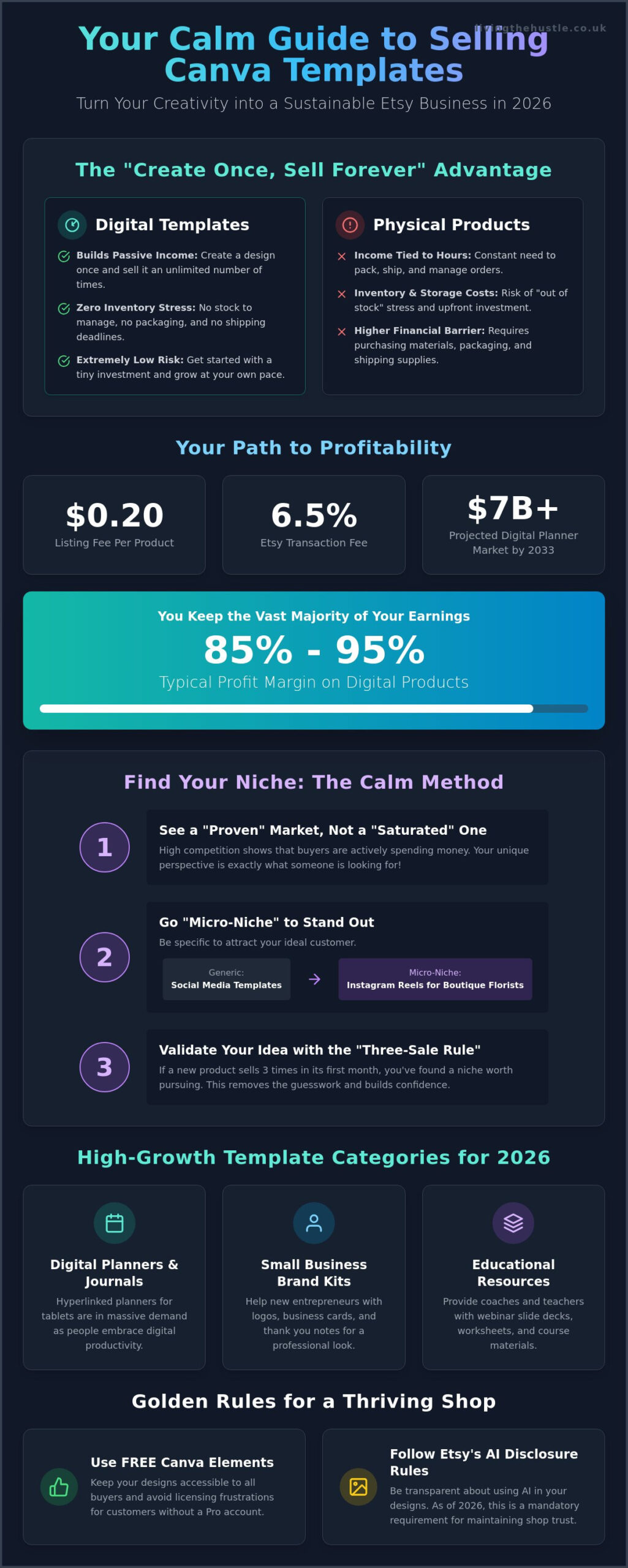
The “Create Once, Sell Forever” model is the heart of a peaceful business. Unlike physical goods, you don't have to worry about restocking shelves or managing inventory counts. Once your design is live in Etsy's marketplace, it can sell hundreds of times without any extra effort from you. This allows you to focus on the creative process you love, rather than the repetitive tasks that often lead to burnout. It's a sustainable way to earn because your income isn't strictly tied to how many hours you work each day.
Starting this type of business requires very little financial risk. You can list your first product for just $0.20. With Etsy's transaction fee at 6.5% and digital profit margins typically reaching between 85% and 95%, you keep the vast majority of your earnings. In 2026, the demand for niche digital solutions is higher than ever. Research shows the global market for digital planners alone is projected to exceed $7 billion by 2033. By focusing on specific problems for specific people, you can carve out a profitable space without feeling like you're shouting into a void.
The Shift from Physical to Digital Inventory
Physical products often come with “out of stock” stress and the constant pressure of shipping deadlines. Digital inventory removes these barriers entirely. There is no storage unit to rent and no packaging supplies to buy. This shift supports a lifestyle of calm entrepreneurship where your business fits into your life, not the other way around. If you're looking to refine your systems as you grow, the Template Creators Society offers a structured path to scaling your shop without sacrificing your well-being.
Who is Buying Canva Templates?
Your customers are looking for ways to simplify their own busy lives. Small business owners often need quick social media graphics to keep their brands active. Brides-to-be search for affordable, editable wedding stationery that they can print at home. Teachers and coaches look for structured worksheets and planners to help their students succeed. When you understand how to sell canva templates on etsy, you're essentially selling time and ease to people who truly value it. Your designs don't need to be complex; they just need to be useful.
Finding Your Profitable Niche: The Calm Research Method
Do you feel like you've arrived too late to the party? Many beginners worry that the market is already full. In reality, a “saturated” market is actually a “proven” market. It shows that buyers are actively spending money and looking for solutions. The secret to learning how to sell canva templates on etsy without the stress is to find a small corner of that market where you can truly shine. You don't need to compete with everyone; you just need to be the perfect match for a specific group of people.
Your research doesn't have to be a source of headache. You can use tools like eRank for Etsy sellers to see exactly what people are searching for right now. Look for high-demand keywords that have relatively low competition. This data-driven approach removes the guesswork and helps you feel more confident in your creative choices. It turns a scary “what if” into a manageable “I know.”
In 2026, the most successful shops are those that embrace the “Micro-Niche” strategy. Instead of making generic “Social Media Templates,” try creating “Instagram Reels for Boutique Florists.” The more specific you are, the easier it is for your ideal customer to find you. You're solving a specific problem for a specific person, which often leads to higher conversion rates and happier customers.
Validating Your Template Idea
Don't just guess what people want. Look at the current search results and notice what's missing. Read the reviews of top-selling products in your chosen category. Are customers asking for more colors? Do they wish there were more pages in a planner? These gaps are your biggest opportunities. While you're brainstorming, remember to consult the U.S. Copyright Office guidance on templates to ensure your work remains original and protected. Use the “Three-Sale Rule” to stay calm. If a new product sells three times within its first month, you've found a niche worth your energy.
Top Canva Template Categories for 2026
If you're still deciding on a direction for how to sell canva templates on etsy, consider these high-growth categories. Digital planners and hyperlinked journals remain massive as more users move toward tablet-based productivity. Small business brand kits, including logos, business cards, and thank you notes, are also in high demand. Finally, educational resources like “done-for-you” webinar slide decks are perfect for coaches who need to look professional quickly. If you want a structured way to find your perfect niche and scale your efforts, you might enjoy exploring the Template Creators Society for more personalized guidance.
Creating Your Templates: Design, Licensing, and Delivery
Designing for your customer means putting their needs ahead of your own artistic ego. While a complex, multi-layered design might look impressive, your buyer is looking for something they can customize in minutes. Simplicity sells because it's approachable. When you're learning how to sell canva templates on etsy, your goal is to provide a stress-free experience for the end-user. A clean, well-organized layout is far more valuable than a cluttered one that's difficult to edit. Focus on white space, readable fonts, and a clear hierarchy to make your templates truly useful.
The Golden Rule of template creation is simple: only use Free Canva elements. If you include Pro graphics or fonts, your customer will be prompted to pay Canva a fee to download their finished design. This creates immediate friction and often leads to frustrated messages or negative reviews. By sticking to free elements, you ensure that every customer can use your product without any hidden costs. If you want to dive deeper into the creative process, exploring the art of design can help you create professional products that still feel light and easy to use.
Canva Pro vs. Canva Free: What You Need to Know
Many beginners feel a deep sense of licensing anxiety when they start. To keep things manageable, we recommend designing within a Free Canva account. This naturally prevents you from accidentally using a Pro element that could complicate your buyer's experience. Commercial use in this context means you're selling a unique design you created from scratch using Canva's tools, which your customer then uses for their own business or personal projects. You aren't reselling Canva's stock designs; you're selling your original creative work. If you're ready to move toward the administrative side, this guide to starting an Etsy shop provides excellent context for your new venture.
The Delivery Process: From Purchase to Download
Etsy allows you to upload digital files for instant download. Since you're selling a link, you'll need to create an “Instruction PDF” in Canva to serve as your delivery note. This document should include a clear button or link to your template, along with a few simple steps on how to use it. This small effort significantly reduces customer support messages and helps your buyer feel supported from the moment they click purchase.
Make sure your template link is “clean.” When you share your work, specifically select the “Template Link” option in Canva. This creates a fresh copy for the buyer and ensures they don't see your personal folders or account details. To encourage five-star reviews, consider adding a small “Bonus” to your delivery PDF, such as a matching checklist or a set of social media icons. It's a gentle way to exceed expectations while building a brand rooted in generosity and care.
Setting Up Your Etsy Shop for Calm Success
Choosing a name for your shop is an exciting first step, but try not to overthink it. A name that allows for growth is often better than one that is too specific. If you name your shop “The Pink Planner Co,” you might feel stuck if you later decide to design blue business cards or neutral social media kits. Pick something that reflects your style while leaving room for your creativity to evolve. Once your name is set, you can focus on the technical details that help people find your work.
Applying Etsy SEO in 2026 is essential for getting your digital products seen. You don't need to be a tech expert to master this. Start by using your primary keywords in your titles and tags naturally. When you understand how to sell canva templates on etsy, you realize that your shop is a bridge between a buyer’s problem and your creative solution. Use clear, descriptive language that matches what a real person would type into a search bar.
Visuals are just as important as keywords. Since you aren't selling physical items, you don't need a fancy camera or a studio. You can use digital mockups to show your templates in action. Place your designs inside a tablet or phone frame within Canva to give buyers a realistic view of how they’ll use the product. When it comes to pricing, remember to account for the $0.20 listing fee and the 6.5% transaction fee. Your goal is to remain competitive while ensuring your business stays profitable and sustainable.
Writing Descriptions That Convert
A great description helps a buyer feel confident in their purchase. Use the “Problem-Solution-Feature” framework. Start by acknowledging the struggle they face, like feeling overwhelmed by social media. Then, present your template as the easy solution and list the specific features, such as the number of pages or editable colors. Always include a clear disclaimer that this is a “Digital Download Only” and “No Physical Product” will be shipped. This simple step prevents confusion and keeps your customer experience peaceful.
Creating a Calm Brand Identity
Your shop’s vibe should feel like a warm invitation. Consistent color palettes and fonts make your brand look professional and trustworthy. If you're feeling stuck on your visual style, using the Blog, Brand & Bloom Workbook can help you define your shop’s unique identity with ease. Don't forget to fill out your “Meet the Maker” section. Buyers love to see the person behind the designs, and sharing a bit of your story builds an authentic connection that a faceless shop simply can't match.
Ready to lay a solid foundation for your creative business? You can grab the Blog, Brand & Bloom Workbook today to start building a brand that feels as good as it looks.
Scaling Your Business Without the Burnout
Scaling your presence doesn't have to mean sacrificing your weekends or your mental health. A common myth suggests that the only way to win is by flooding your shop with hundreds of listings in a short window of time. This approach often leads directly to exhaustion. In reality, ten high-quality, deeply helpful templates will always outperform one hundred mediocre ones. When you understand how to sell canva templates on etsy, you realize that conversion is about solving a problem, not just filling a digital shelf. Focus on making each listing a masterpiece of utility, and the algorithm will reward your attention to detail.
You can also use automation to keep your shop busy while you rest. Pinterest is a powerful, low-stress tool for driving traffic to your Etsy shop without the need for constant social media “hustle.” Once you set up a few well-designed pins, they can continue to bring in potential buyers for months or even years. When it comes to customer service, handle every inquiry with grace but maintain firm boundaries. You don't have to answer messages at midnight to be a successful business owner. Setting clear expectations in your shop policies helps protect your peace while keeping your customers happy.
Managing Your Time as a Calm Creator
Protecting your creative energy is the most important part of your business plan. Try batching your design days so you can stay in a “flow” state without the friction of switching between different types of tasks. Using a Content Planner helps you stay organized and prevents the last-minute panic of wondering what to create next. Success in 2026 isn't defined by an arbitrary sales number. It's about building a project that supports your well-being. Define what success looks like for you, and move toward it at a pace that feels sustainable.
Expanding Beyond Etsy
Once your shop is established and you've mastered how to sell canva templates on etsy, you might consider expanding your horizons. Starting your own website or blog gives you full control over your brand and your customer data. Building an email list is your ultimate insurance policy against sudden algorithm changes or marketplace shifts. If you're ready to move from a casual side project to a full-scale digital product empire, the Template Creators Society provides the structured support and community you need to grow with confidence. You've already done the hard work of starting. Now, you can enjoy the process of building a business that truly lasts.
Your Journey Toward Creative Freedom Starts Here
Building a business that supports your well-being is a brave and beautiful choice. You've learned that success on Etsy isn't about working more hours; it's about choosing the right micro-niche and creating helpful, high-quality designs. By sticking to free elements and using clear delivery PDFs, you can avoid technical stress and build a reputation for excellence. These small, intentional steps create a foundation that lasts much longer than any high-pressure trend.
Now that you have the roadmap for how to sell canva templates on etsy, it's time to take that first gentle step. You don't have to navigate this path alone or feel overwhelmed by the technical details. Expert mentors who have already built profitable shops are ready to share their wisdom with you. This transition from a side project to a flourishing business is entirely achievable when you have the right support.
If you're ready to turn your creative spark into a sustainable income stream, we invite you to join the Template Creators Society and build your dream digital business today! You'll find a community of like-minded “Calm Creators” and the structured guidance needed to empower your journey. Your future self will thank you for starting today.
Frequently Asked Questions
Do I need Canva Pro to sell templates on Etsy?
You don't need a Canva Pro subscription to start your shop. Designing in a free account is actually a safer choice because it ensures your customers won't face unexpected fees when they try to download their work. This approach keeps your process simple and your buyers happy. It's a great way to keep your initial costs low while you learn the basics of your new creative business.
How do I actually send the template to the customer after they buy?
You deliver your product by uploading an instruction PDF to your Etsy listing as a digital file. This PDF contains a “Template Link” generated in Canva, which gives your customer their own fresh copy of the design to edit. This method is the standard for how to sell canva templates on etsy because it's automated and secure. It allows you to provide value immediately after the purchase without any manual work.
Is it legal to sell Canva templates? What about copyright?
Selling your original designs is completely legal and supported by Canva's policies. You must ensure your work is a unique creation and not just a slight modification of an existing Canva layout. Following official guidance on original works ensures your business remains professional and protected. It's all about using the tools provided to build something that is uniquely yours and helpful to others.
How many templates should I have in my shop before I launch?
Aim for five to ten high-quality listings when you first open your digital doors. While some people suggest posting hundreds of products, a small, curated collection looks professional and is much easier for you to manage. This “quality over quantity” approach prevents you from feeling overwhelmed during your first few weeks. You can always add more designs as you get comfortable with your shop’s rhythm.
Can I sell templates I made using Canva’s pre-made layouts?
No, you cannot resell Canva’s pre-made layouts as your own templates. Your designs must be original works created from a blank canvas using individual elements, fonts, and colors. This distinction is crucial for staying within Canva’s terms of service and maintaining your shop's integrity. Focus on solving a specific problem for your niche with a fresh, custom design that you built from the ground up.
What happens if a customer wants a refund on a digital product?
Digital products are typically non-refundable because they cannot be returned in the traditional sense once the file is accessed. It's helpful to state this clearly in your shop policies to manage expectations from the start. If a customer has a technical issue, focus on helping them solve it with kindness. A helpful response can often turn a frustrated buyer into a loyal, repeat customer for your shop.
How much money can I realistically make selling Canva templates in 2026?
Income varies based on your chosen niche and the time you invest in your shop's growth. While top sellers in 2026 can earn significant amounts, many beginners start by earning a few hundred dollars of extra income each month. Focus on building a sustainable, low-stress income stream rather than chasing overnight riches. Steady, manageable growth is often the most peaceful path to long-term success in the digital marketplace.
Do I need to be a graphic designer to be successful?
You don't need a formal degree in graphic design to be successful in this field. Learning how to sell canva templates on etsy is more about understanding what your specific audience needs and providing a simple, beautiful solution. If you have a good eye for layout and a genuine desire to help others, you have everything you need to start. Your unique perspective is your most valuable asset.